Lets Defend - SOC Event ID 93

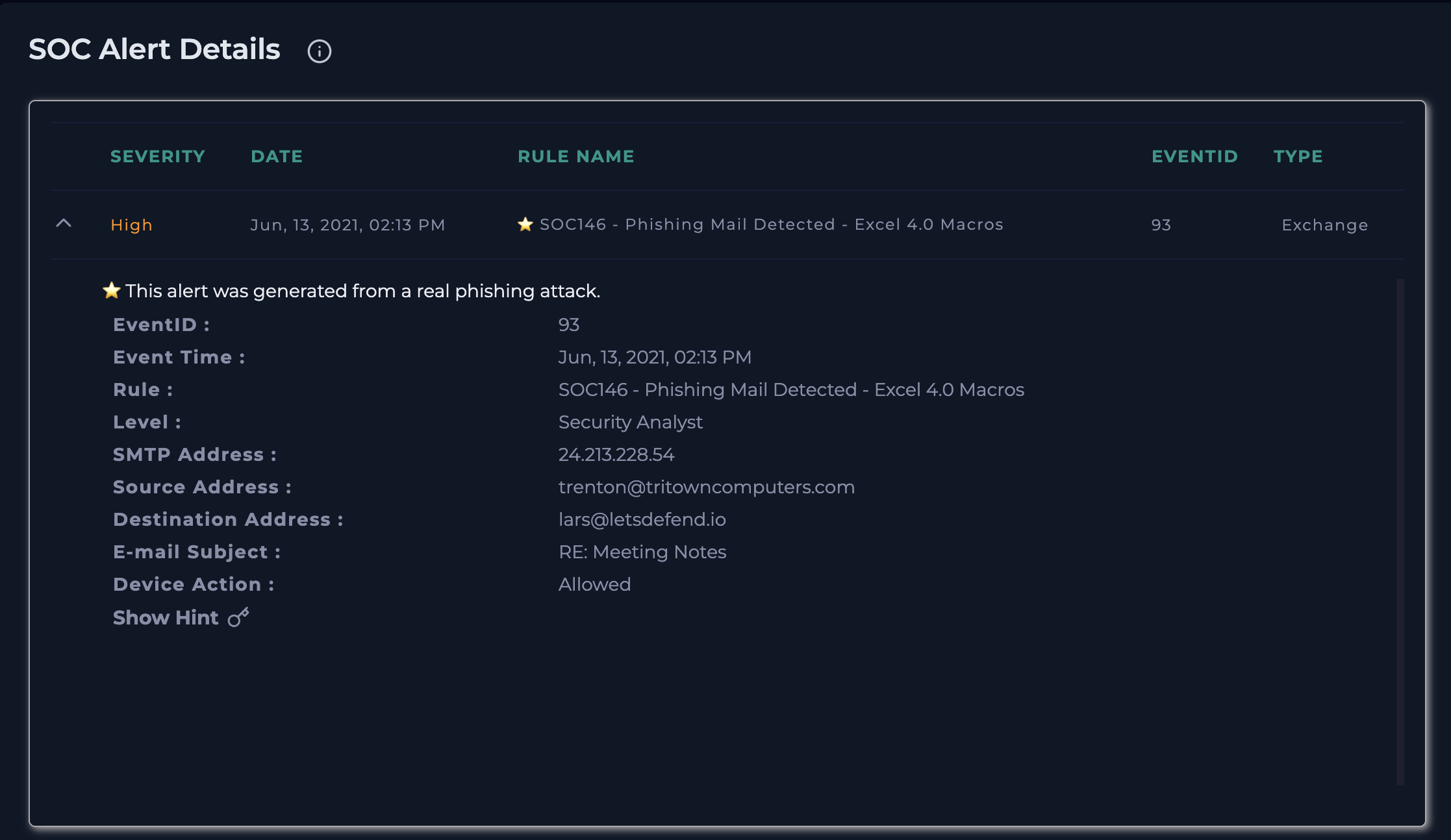
SOC146 - Phishing Mail Detected - Excel 4.0 Macros ( This alert was generated from a real phishing attack.)
Security Incident Report
Phishing Email with Malicious Excel 4.0 Macros
1. Incident Summary
An alert was triggered for a suspected phishing email containing a malicious attachment using Excel 4.0 macros. These types of macros are commonly abused by attackers to execute malware on a victim’s system.
2. Alert Details
- Alert Name: SOC146 - Phishing Mail Detected - Excel 4.0 Macros
- Event ID: 93
- Date & Time: June 13, 2021, 02:13 PM
- Severity Level: Security Analyst
- Device Action: Allowed (Email was successfully delivered)
3. Email Information
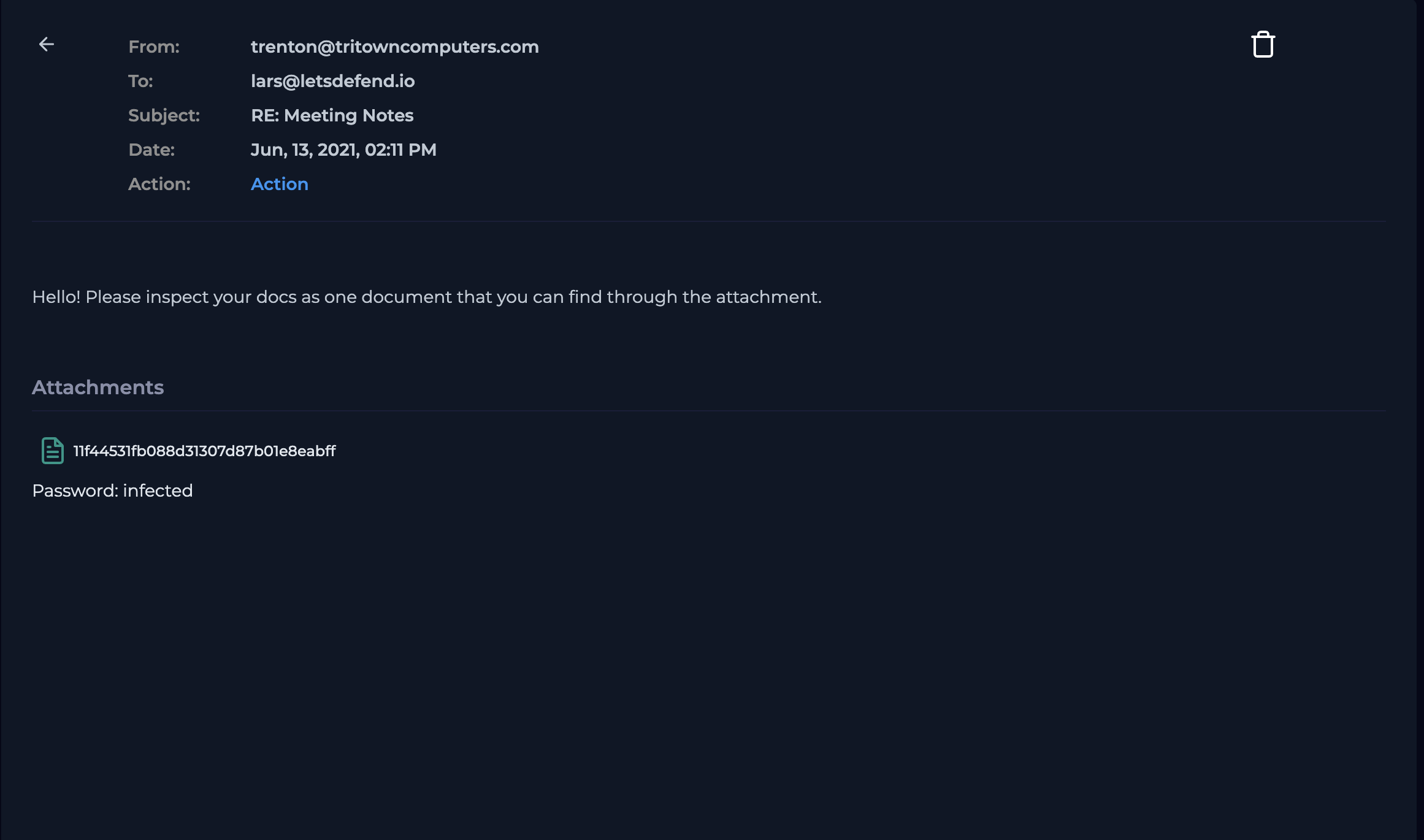
- Sender: trenton@tritowncomputers.com
- Source IP: 24.213.228.54
- Recipient: lars@letsdefend.io (172.16.17.57)
- Subject: RE: Meeting Notes
4. Suspicious Indicators Identified
- The email contained a password-protected ZIP attachment:
- File Name:
11f44531fb088d31307d87b01e8eabff.zip.zip - Password:
infected
- File Name:
- The Zip file contained 3 files(2 dll{dynamic link library files} and 1 xls file)
- Password-protected files are commonly used to bypass email security filters.
- The attachment uses Excel 4.0 (XLM) macros, a known technique for delivering malware.
5. Attachment Analysis
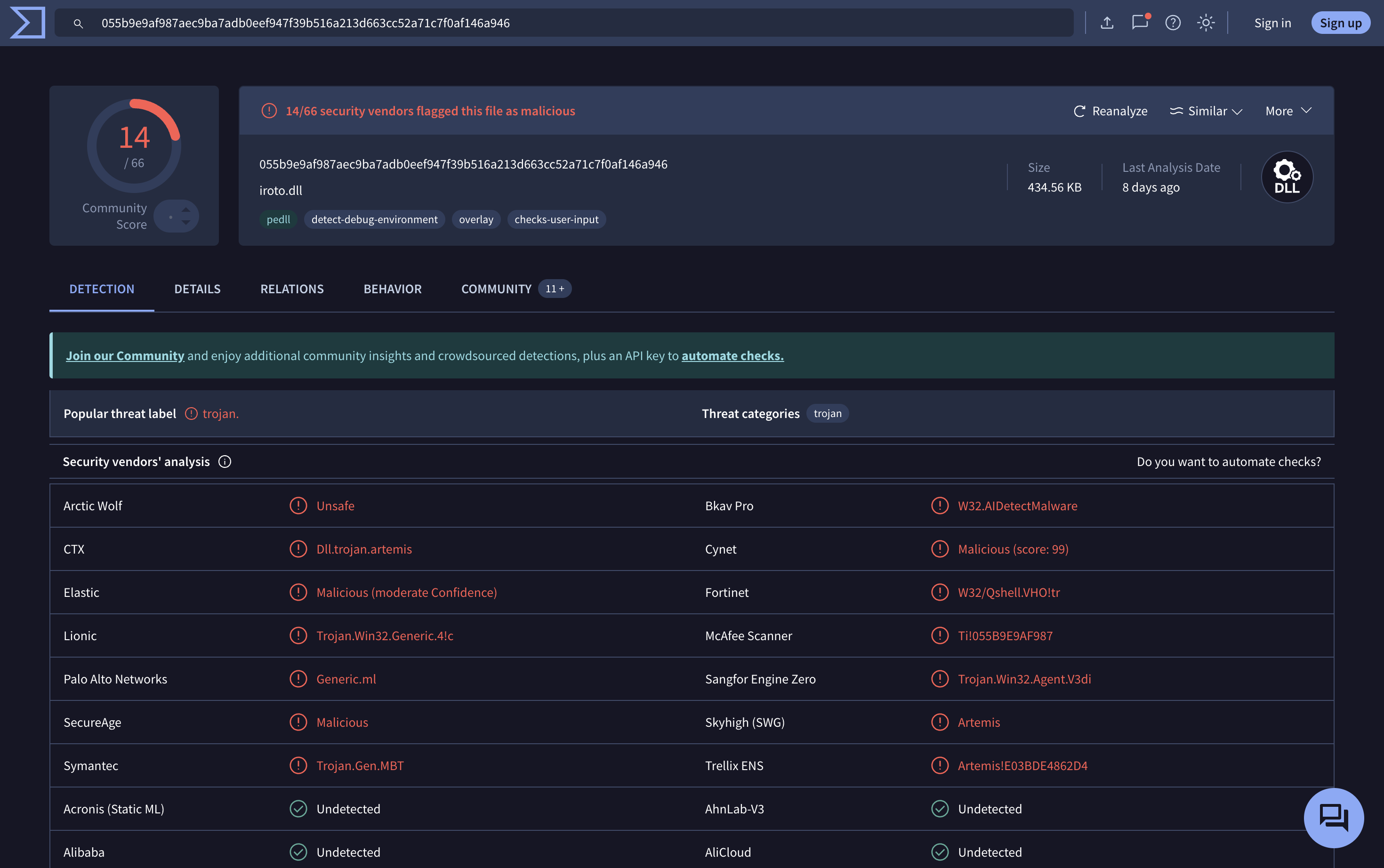
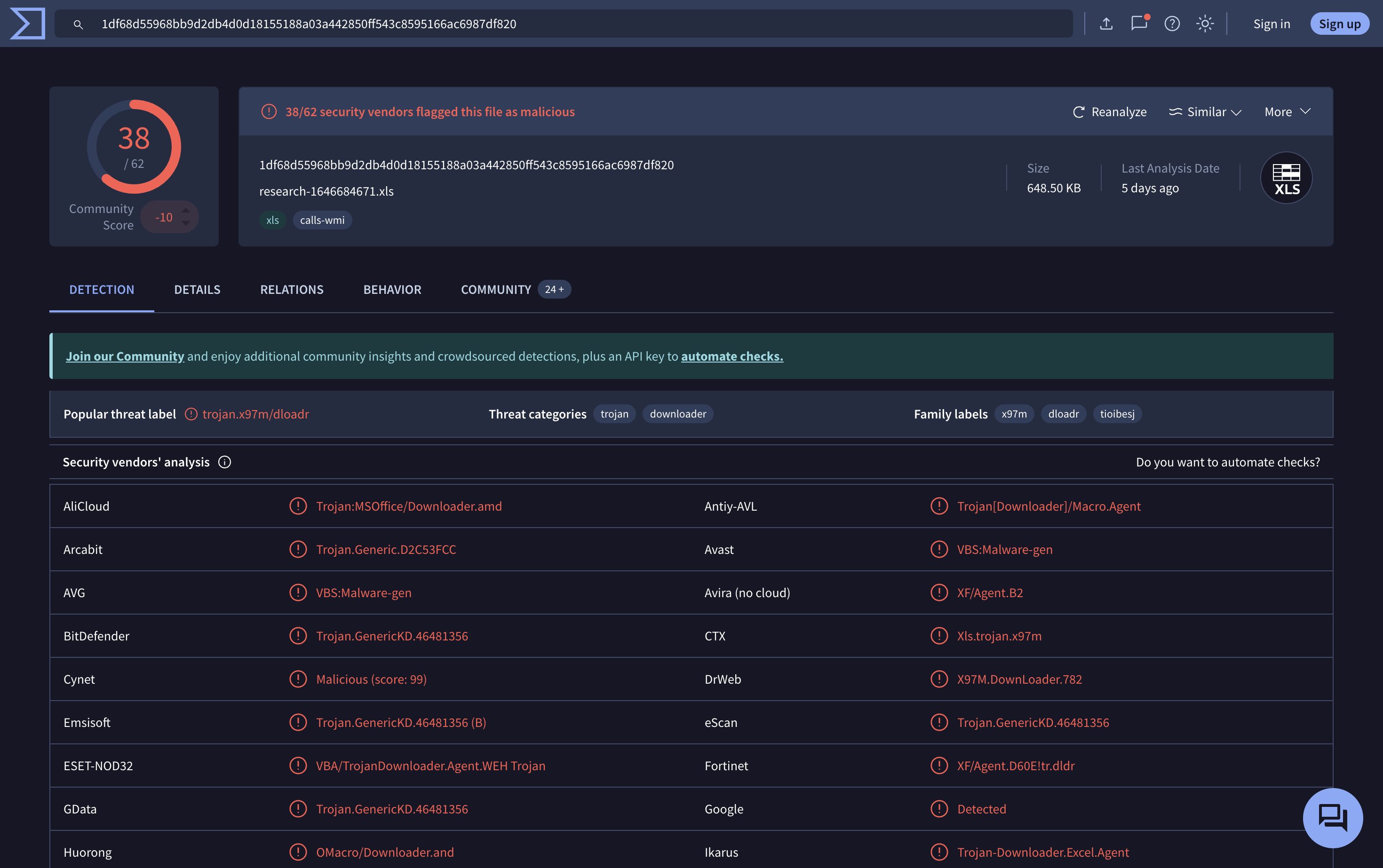
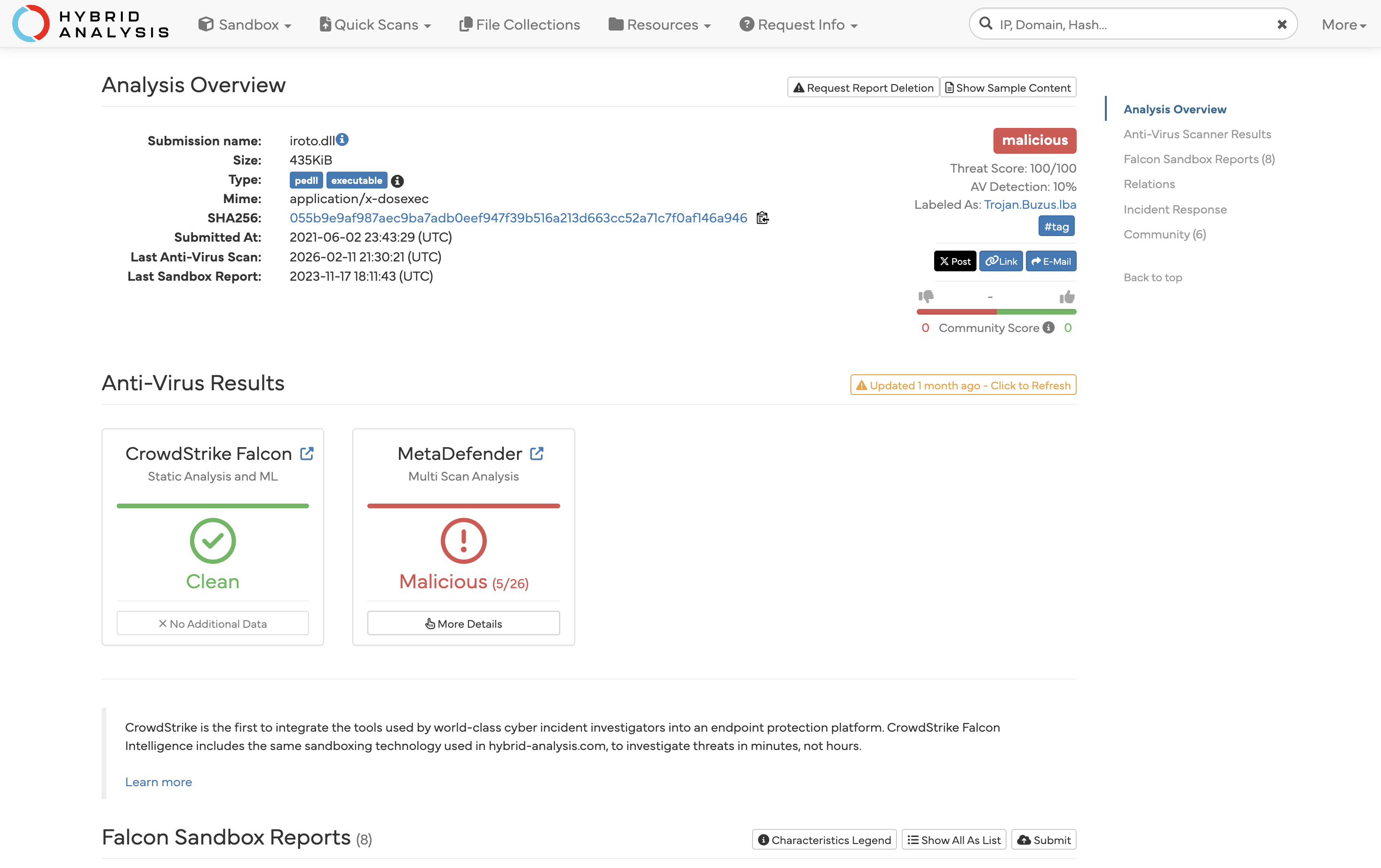
The attachment was analyzed using external sandbox tools.
- Tools Used:
- VirusTotal
- Hybrid Analysis
- Result:
- The Three files was confirmed to be malicious.
- The malware is capable of executing macros and initiating outbound network connections (potential Command-and-Control communication).
6. Email Delivery Status
- The alert shows “Device Action: Allowed”, confirming that the email was delivered to the user’s mailbox.
7. Log Analysis (Critical Step)
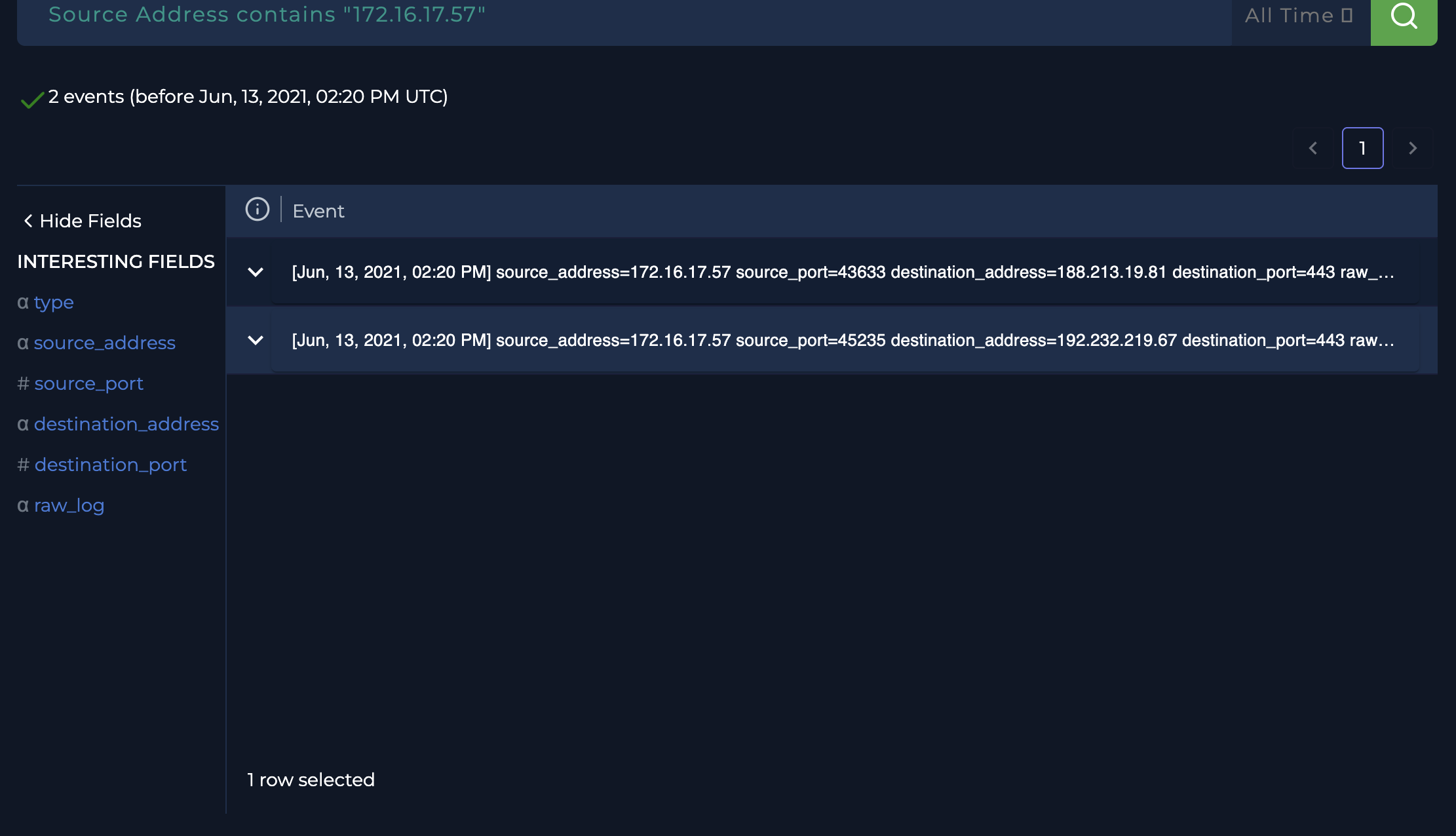
To determine whether the malicious file was executed, network logs were reviewed.
Observed Activity:
At 02:20 PM, shortly after email delivery, the following outbound connections were recorded:
- 172.16.17.57 → 188.213.19.81 (Port 443)
- 172.16.17.57 → 192.232.219.67 (Port 443)
Analysis:
- These connections originated from the recipient’s system.
- The traffic occurred within minutes of receiving the phishing email.
- The connections were made over HTTPS (port 443), commonly used by malware to hide communication.
Conclusion from Logs:
- The timing and nature of the connections strongly indicate that the malicious attachment was opened and executed.
- The external IP addresses are likely associated with Command-and-Control (C2) communication.
8. Incident Assessment
- Threat Type: Phishing with malicious attachment
- Attack Vector: Email (ZIP file containing Excel macro malware)
- User Interaction: Confirmed (File was opened)
- C2 Communication: Likely observed
- Impact Level: Medium to High
9. Response Actions Recommended
- Immediately isolate the affected system (172.16.17.57).
- Block the identified external IP addresses:
- 188.213.19.81
- 192.232.219.67
- Remove the phishing email from the user’s mailbox.
- Perform a full malware scan on the affected system.
- Reset user credentials as a precaution.
- Investigate for any further lateral movement or persistence.
10. Recommendations for Prevention
- Disable Excel 4.0 macros across the organization.
- Block or inspect password-protected attachments.
- Enhance email filtering policies.
- Provide phishing awareness training to users.
- Deploy or strengthen Endpoint Detection and Response (EDR) solutions.
MITRE ATT&CK Mapping
| Tactic | Technique ID | Technique Name | Description |
|---|---|---|---|
| Initial Access | T1566.001 | Spearphishing Attachment | Malicious ZIP attachment delivered via phishing email |
| Execution | T1204.002 | User Execution: Malicious File | User opened the attachment triggering execution |
| Execution | T1059.005 | Command and Scripting Interpreter: Visual Basic (Macros) | Excel 4.0 macros used to execute malicious code |
| Defense Evasion | T1027 | Obfuscated Files or Information | Password-protected ZIP used to bypass detection |
| Command & Control | T1071.001 | Application Layer Protocol: Web Protocols | Outbound HTTPS communication to external IPs |
| Command & Control | T1105 | Ingress Tool Transfer (Potential) | Possible download of additional payloads from C2 |
11. Conclusion
This incident involved a phishing email delivering a malicious Excel 4.0 macro payload. The email successfully reached the user, and subsequent log analysis confirmed that the attachment was opened, leading to suspicious outbound network connections. This indicates a likely system compromise and attempted communication with attacker-controlled infrastructure.
12. Lessons Learned
Phishing emails often use evasion techniques:
Attackers commonly use password-protected ZIP files and Excel 4.0 macros to bypass traditional email security controls.
User interaction is a critical risk factor:
Even when detection systems flag malicious emails, successful delivery combined with user action can lead to compromise.
Behavioral analysis is essential:
Not all threats can be confirmed using static indicators alone. Correlating event timing and network behavior is crucial in identifying malicious activity.
Outbound traffic analysis is key to detecting compromise:
Monitoring unexpected external connections, especially shortly after suspicious events, can reveal malware execution and C2 communication.
Defense-in-depth is necessary:
Relying solely on email filtering is insufficient. Additional controls such as EDR, macro restrictions, and user awareness are essential.
13. Skills Demonstrated
Phishing Analysis:
Identified suspicious characteristics in email metadata, including sender details, subject line, and attachment type.
Malware Analysis (Basic):
Performed attachment analysis using sandbox tools (VirusTotal, Hybrid Analysis) to determine malicious behavior.
Log Analysis & Threat Hunting:
Investigated proxy logs to identify suspicious outbound connections and correlate them with the incident timeline.
Incident Investigation & Correlation:
Connected multiple data points (email delivery, attachment analysis, network logs) to determine that the file was executed.
Security Decision-Making:
Made an informed judgment under uncertainty by combining indicator-based and behavior-based analysis.
Reporting & Documentation:
Created a structured and professional incident report suitable for SOC environments and portfolio presentation.
14. Key Takeaway
This investigation highlights the importance of combining technical analysis with critical thinking. Even when clear indicators are limited, analyzing user behavior and network activity can reveal the true impact of a security incident.