GlacierCTF – GetResetHard

GlacierCTF – GetResetHard
Description
- Kevin joined our company.
- Kevin took a s**t on the carpet.
- Kevin
git reset --hardthe entire repo. - Kevin force pushed.
- Kevin left the company.
Now it’s your turn to fix the mess. You get the compressed disk with the repository.
Note: The repo is completely safe.
Downloadable file: gitresethard.tar.gz
Process
Download the
gitresethard.tar.gz.- Extract the compressed file using the command below.
1
 tar -xzvf gitresethard.tar.gz
After decompressing the file, change the directory to
gitresethard/repo.- Type in the following command to reveal any hidden/dangling commits:
1
 git fsck --lost-found
- A hidden/dangling commit is present. Let’s see the contents using the
git showcommand.1
git show <dangling commit_id>
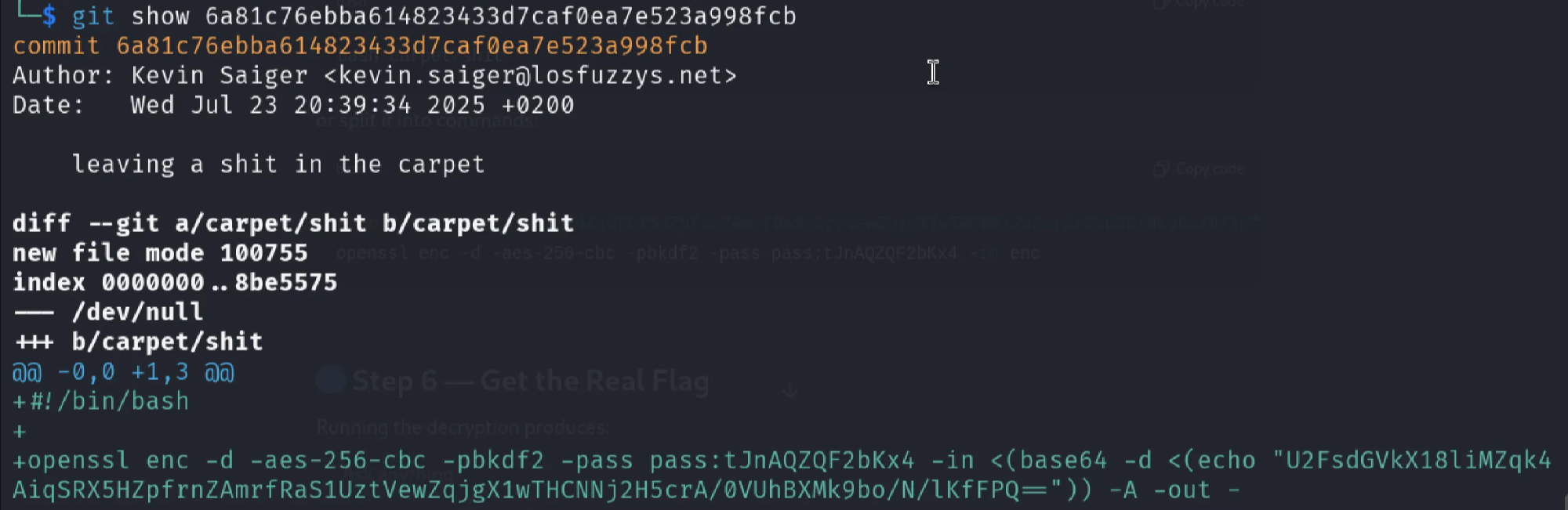
The dangling commit shows a connection using
openssland also includes a password which is being encrypted. I chose to useechoto pipe it directly.
- After running the command, we got the flag!
Flag:
gctf{0113_wh0_g1t_r3s3t3d_th3_c4t_4789}
Summary
| Step | Action |
|---|---|
| 1 | Extract the repo archive |
| 2 | Run git fsck to detect orphaned objects |
| 3 | Identify dangling commit 6a81c76e… |
| 4 | View its contents with git show |
| 5 | Find OpenSSL encryption clues |
| 6 | Recreate decryption using echo → openssl |
| 7 | Recover the flag |
This post is licensed under CC BY 4.0 by the author.