SMB-Vulnerabilites-Detection-Using-Enum4Linux

Summary
Practical assessment of SMB (Server Message Block) exposure using nmap, enum4linux, and smbclient to discover SMB services, enumerate users/shares, and demonstrate file transfer to a writable share in a controlled lab.
Aim
The Aim is to scan for SMB vulnerabilities using enum4linux.
Objective
Learning objective
- To understand how SMB’s works and to find out the vulnerabilities present in the vulnerabilities.
- Launch enum4linux and explore its capabilities.
- Identify computers with SMB services running.
- Use enum4linux to enumerate users and network file shares.
- Use smbclient to transfer files between systems.
Theory
NetBIOS is one of the important part of the networking, operating systems and applications. There are various name resolution such as DNS(Domain Name System), NetBIOS(Network Basic Input/Output) and LLMNR( Link-Local Multicast Name Resolution)
The NetBIOS and LLMNR are basically used in Windows Operating System for the host identification, The LLMNR is based on the DNS format, which allows for local-link name resolution without the need for a particular DNS server.
Example: Windows Host resolving a printer or shared folder name via NetBIOS
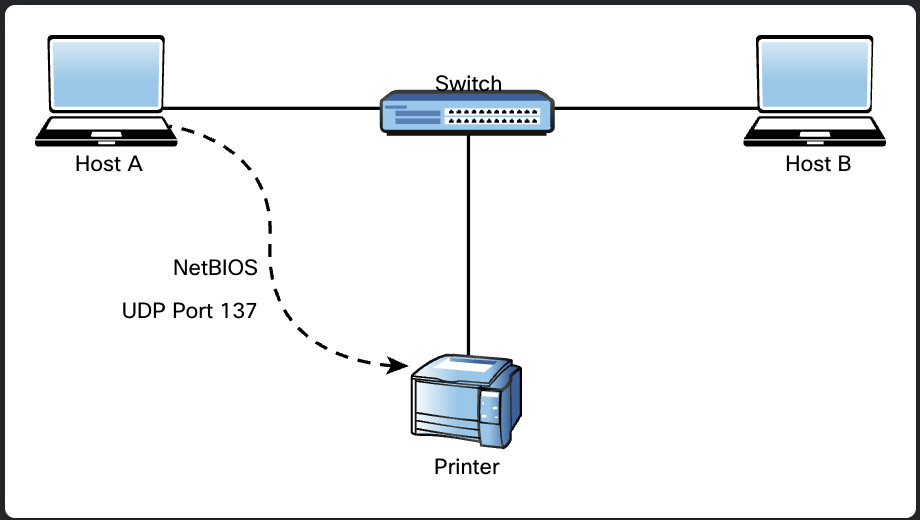
The NetBIOS provides 3 different services
1.NetBIOS-NS(Name Service)- used for name registration and resolution.
2.NetBIOS-DGS(Data Gram Service) - used for connection less communication.
3.NetBIOS-SSN(Session Service) - used for connection oriented communication.
You may be asking what is the relation between the SMB and NetBIOS and other name resolution??? I got that too.
The relation in my opinion is that the SMB is a file sharing protocol that uses the several name resolutions that includes NetBIOS, LLMNR and DNS. Hence the name given SMB or Server Message Block it uses these port numbers.
TCP - 135 MS-RPC(Microsoft Remote Procedure Call)
UDP - 137 NetBIOS-NS
UDP - 138 NetBIOS-DGS
TCP - 139 NetBIOS SSN
TCP - 445 SMB (file Sharing)
Common Vulnerabilities
- Most of the workgroup names are kept as the default name (WORKGROUP) and weak credentials often left unchanged
- Attackers can list out machines and brute force passwords easily.
Practical Procedure
Topology
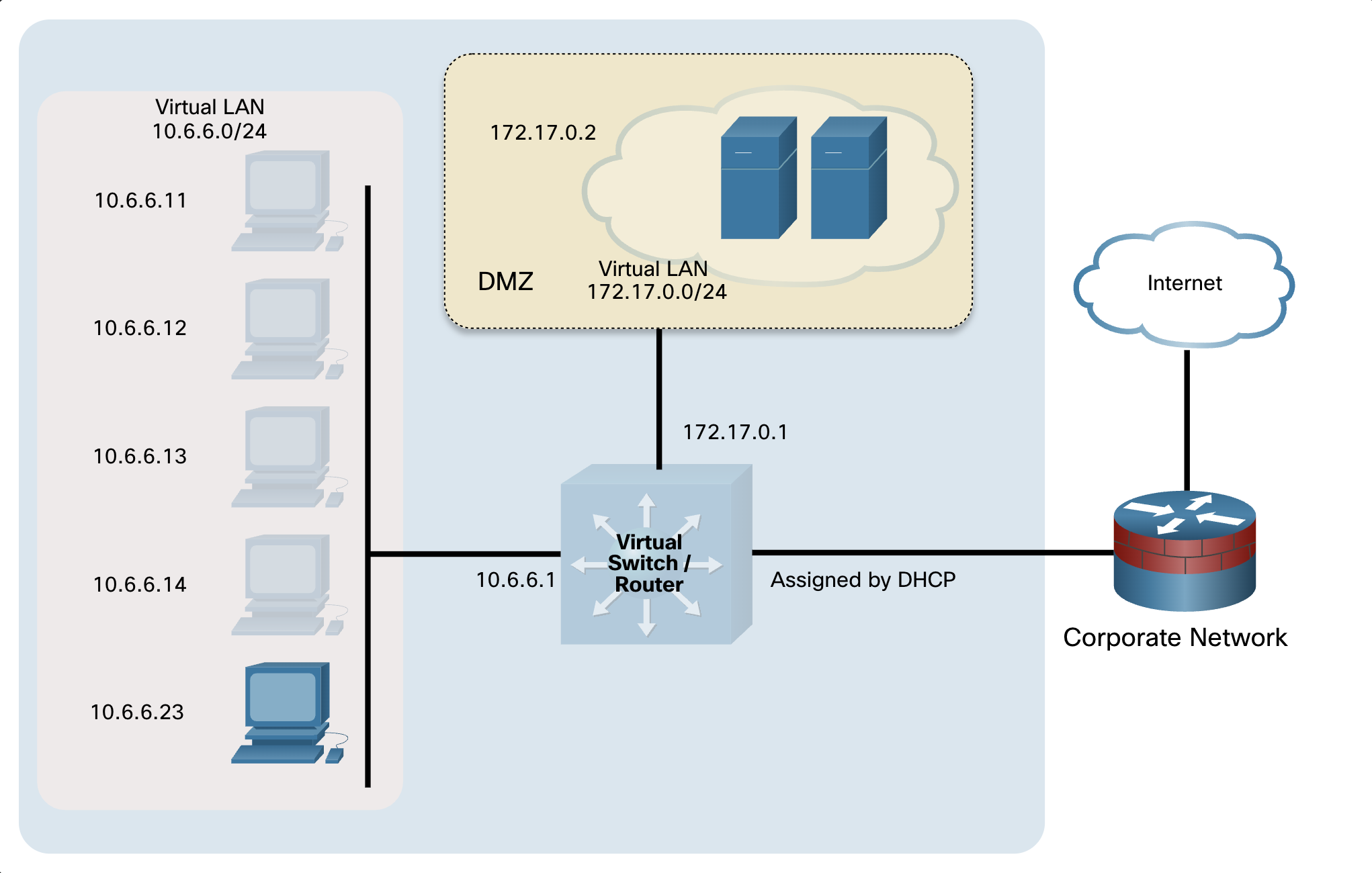
Part 1: Launching Enum4linux and exploring its capabilities
- Launch Kali linux Vm and open the terminal session from the menu bar at the top of the screen.
- Most of the “enum4linux” commands must be run as “root”, so type in the “sudo su” command to obtain the root access.
Type in the “enum4linux -help” command in order to list out different options available to enumerate the host.
1
2
3
4
5
 ─(kali㉿kali)-[~]
 └─$sudo su
 [sudo] password for kali:
 ┌──(root㉿kali)-[/home/kali]
 └─#enum4linux –help
- Before going to the step2 we have to understand these acronyms in order to make less confusing.
- SID (Security Identifier):
A unique number given to every user, group, or computer in Windows to identify it securely.
→ Think of it like a digital ID card number.
RID (Relative Identifier):
The last part of a SID that uniquely identifies an object within a domain.
→ Like the student roll number within a specific school.
DC (Domain Controller):
A server that stores and manages user accounts, passwords, and security in a Windows domain.
→ Like the school office that keeps all student records.
LDAP (Lightweight Directory Access Protocol):
A protocol used to access and manage directory information (like users and groups) over a network.
→ Like a phonebook system for looking up user details.
Part 2:Using Nmap to find the SMB servers
In order to identify the targets which are using SMB we need to examine the open ports, We learned how to use find and enumerate open ports on the target systems.
The Common open ports on SMB servers are:
TCP 135 RPC
TCP 139 NetBIOS Session
TCP 389 LDAP Server
TCP 445 SMB File Service
TCP 9389 Active Directory Web Services
TCP/UDP 137 NetBIOS Name Service
UDP 138 NetBIOS Datagram
Perform nmap scan on the target 172.17.0.2
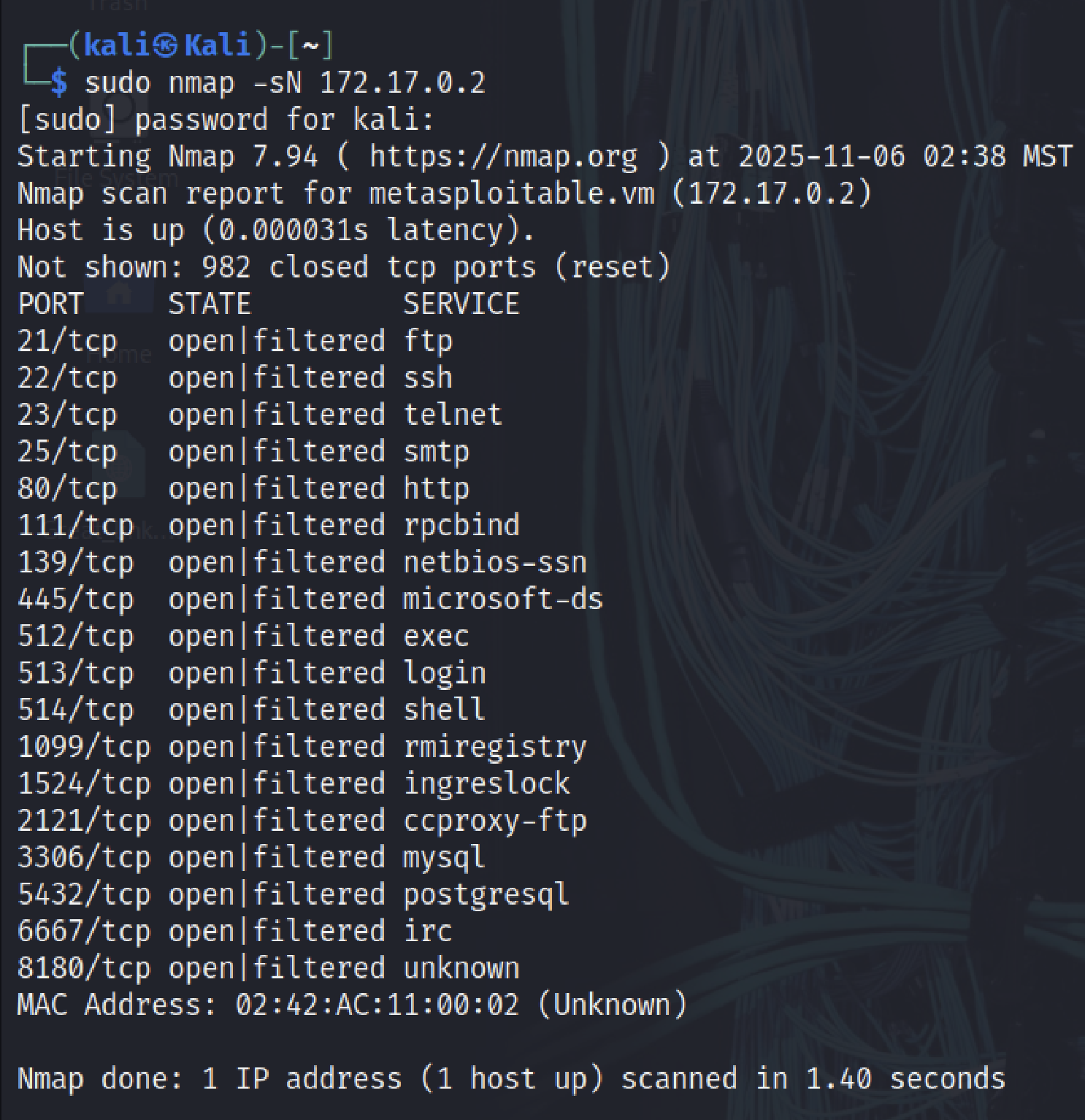
- From the result I observed that the netbios-ssn(139/tcp) and microsoft-ds(445/tcp) were open which means the SMB severs are open and we can use the “enum4linux” tool.
- While using “enum4linux” there are some options which we can use, but here are the most common options which are used
- U - find configured users
- S - get a list of file shares
- G - get a list of the groups and their members
- P - list the password policies
- i - get a list of printers
Type in the following command to find the configured users.
1
2
3
4
5
6
7
8
9
10
11
12
13
14
15
16
17
18
19
20
21
22
23
24
25
26
27
28
29
30
31
32
33
34
35
36
37
38
39
40
41
42
43
44
45
46
 enum4linux -U 172.17.0.2

Starting enum4linux v0.9.1

=========================================( Target Information )=========================================

Target ........... 172.17.0.2
RID Range ........ 500-550,1000-1050
Username ......... ''
Password ......... ''
Known Usernames .. administrator, guest, krbtgt, domain admins, root, bin, none

=============================( Enumerating Workgroup/Domain on 172.17.0.2 )=============================

[+] Got domain/workgroup name: WORKGROUP

====================================( Session Check on 172.17.0.2 )====================================

[+] Server 172.17.0.2 allows sessions using username '', password ''

=================================( Getting domain SID for 172.17.0.2 )=================================

Domain Name: WORKGROUP
Domain Sid: (NULL SID)

[+] Can't determine if host is part of domain or part of a workgroup

========================================( Users on 172.17.0.2 )========================================

index: 0x1 RID: 0x3f2 acb: 0x00000011 Account: games    Name: games     Desc: (null)

index: 0x2 RID: 0x1f5 acb: 0x00000011 Account: nobody   Name: nobody    Desc: (null)
index: 0x3 RID: 0x4ba acb: 0x00000011 Account: bind     Name: (null)    Desc: (null)
index: 0x4 RID: 0x402 acb: 0x00000011 Account: proxy    Name: proxy     Desc: (null)
index: 0x5 RID: 0x4b4 acb: 0x00000011 Account: syslog   Name: (null)    Desc: (null)
index: 0x6 RID: 0xbba acb: 0x00000010 Account: user     Name: just a user,111,, Desc: (null)
index: 0x7 RID: 0x42a acb: 0x00000011 Account: www-data Name: www-data  Desc: (null)
index: 0x8 RID: 0x3e8 acb: 0x00000011 Account: root     Name: root      Desc: (null)
index: 0x9 RID: 0x3fa acb: 0x00000011 Account: news     Name: news      Desc: (null)
…redacted…
enum4linux complete on Thu Nov  6 02:45:47 2025
```

“Enum4linux” aggregates output from multiple Samba tools to produce a concise result, if you want to know how each feature is used you can use the “**-v(verbose)**” option to include with it.

For example lets use the list of files shares on the target.
Type in the following command
1
 enum4linux -Sv 172.17.0.2
1 2 3 4 5 6 7 8 9 10 11 12 13 14 15 16 17 18 19 20 21 22 23 24 25 26 27 28 29 30 31 32 33 34 35 36 37 38 39 40 41 42 43 44
[V] Dependent program "nmblookup" found in /usr/bin/nmblookup [V] Dependent program "net" found in /usr/bin/net [V] Dependent program "rpcclient" found in /usr/bin/rpcclient [V] Dependent program "smbclient" found in /usr/bin/smbclient [V] Dependent program "polenum" found in /usr/bin/polenum [V] Dependent program "ldapsearch" found in /usr/bin/ldapsearch Starting enum4linux v0.9.1 ( [http://labs.portcullis.co.uk/application/enum4linux/](http://labs.portcullis.co.uk/application/enum4linux/) ) on Thu Nov 6 02:54:58 2025 =========================================( Target Information )========================================= Target ........... 172.17.0.2 RID Range ........ 500-550,1000-1050 Username ......... '' Password ......... '' Known Usernames .. administrator, guest, krbtgt, domain admins, root, bin, none Attempting to get share list using authentication Sharename Type Comment --------- ---- ------- print$ Disk Printer Drivers tmp Disk oh noes! opt Disk IPC$ IPC IPC Service (metasploitable server (Samba 3.0.20-Debian)) ADMIN$ IPC IPC Service (metasploitable server (Samba 3.0.20-Debian)) Reconnecting with SMB1 for workgroup listing. Server Comment --------- ------- Workgroup Master --------- ------- WORKGROUP METASPLOITABLE
in the Share files enumeration section I observed that there are 5 file shares are present and there are 3 hidden shares (denoted by $ at the end of the name.)
Further more if the penetration testers have yet not obtained any known username/password and they want to achieve it by brute forcing they can do so by knowing the password policies used.
- Type in the command
1
 enum4linux -P 172.17.0.2”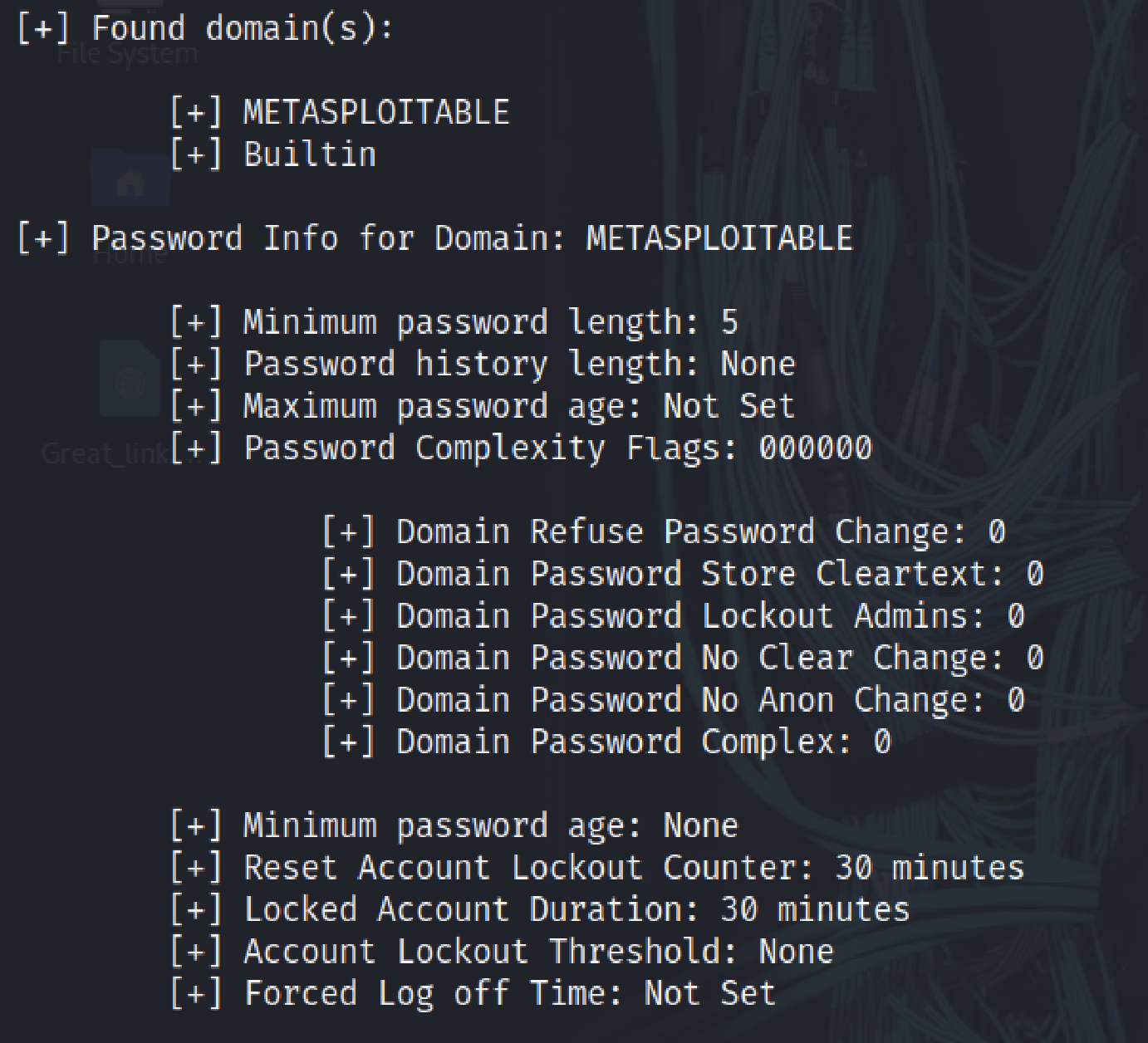
From the report the penetration testers can generate new brute forcing file from other tools and can penetrate the server to obtain certain username/password.
Now If you want to perform “All-in-one” option rather than typing certain single options you can do so by using the -a this option quickly performs multiple SMB operations in one scan.
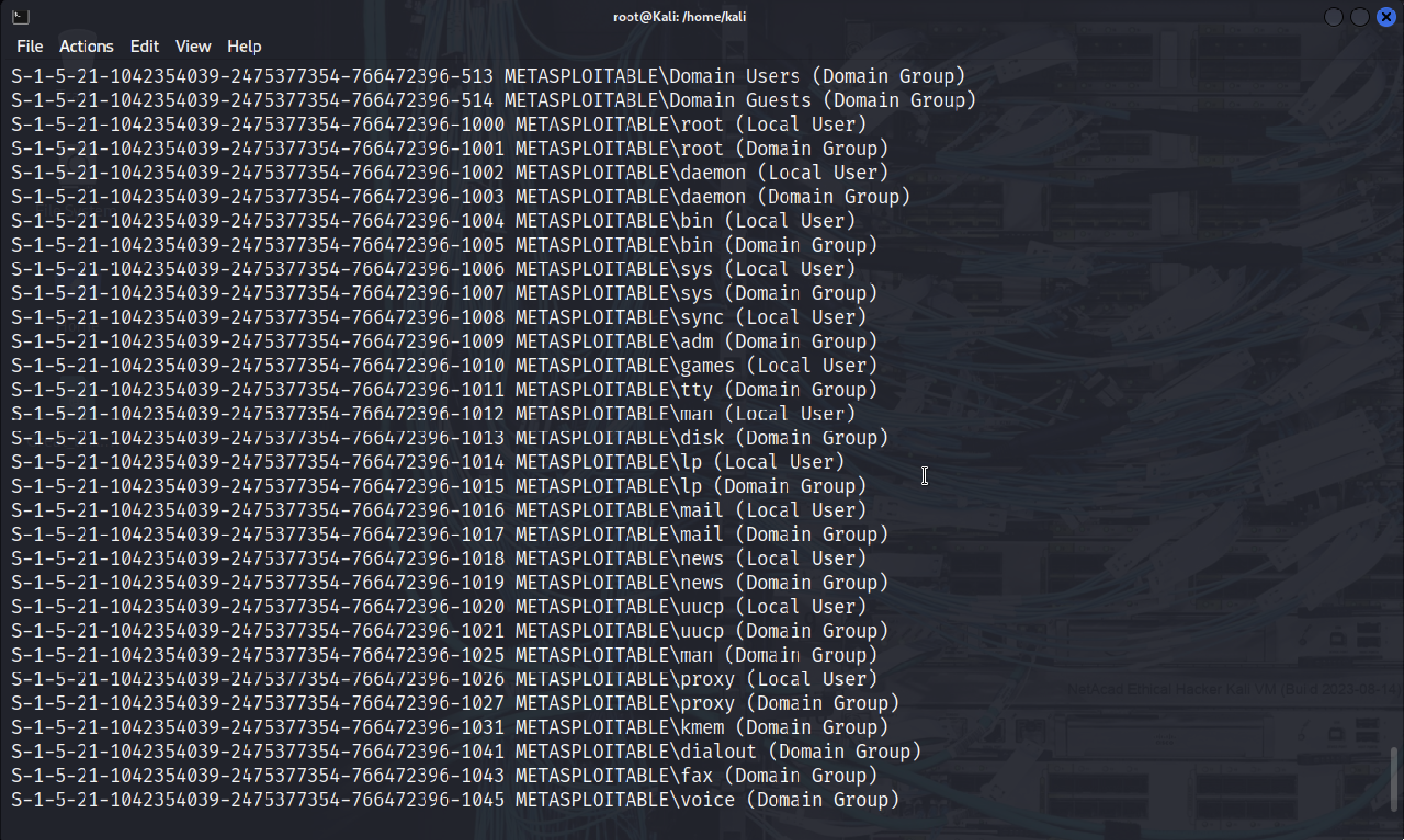
The output will display all the tools aggregated into 1 report.
Using SMB client to transfer files between systems.
Smbclient is a component of Samba that can store and retrieve files, similar to an FTP client, I will use the smbclient to transfer file to a file in to the target system, this basically simulates exploiting network host with malware through an smb vulnerability.
- I created a fake malicious file using vim and then saved it as “badfile.txt”.
Type in the following command “smbclient —help” to display all the options which are available.
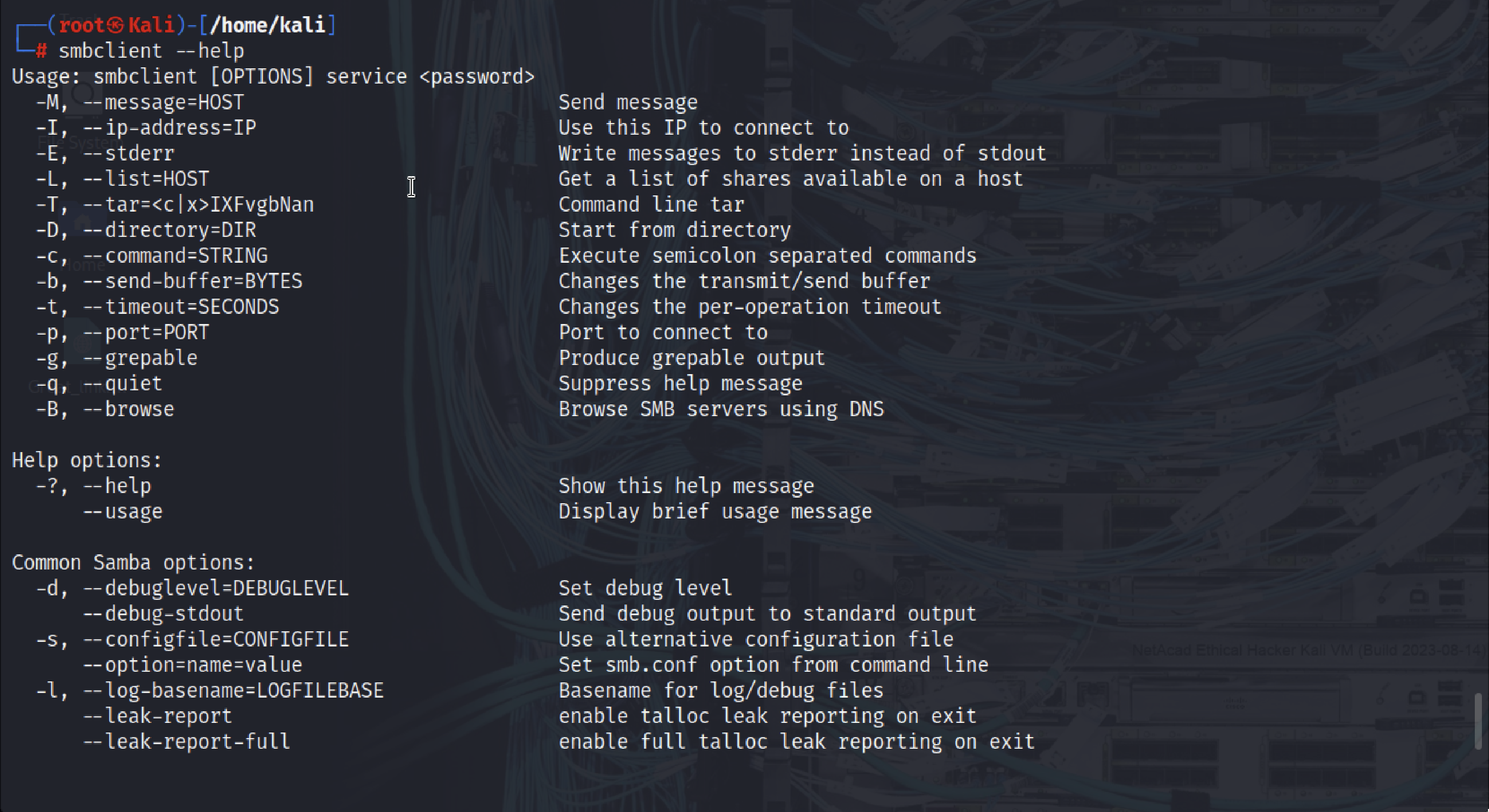
I am going to use the -L command to get a list of shares available on a host(which is the target system) type in the command “smbclient -L 172.17.0.2” and press ENTER when asked for password. (The double / character before the IP address and the / following it are necessary if the target is a Windows computer, for example //172.17.0.2/)
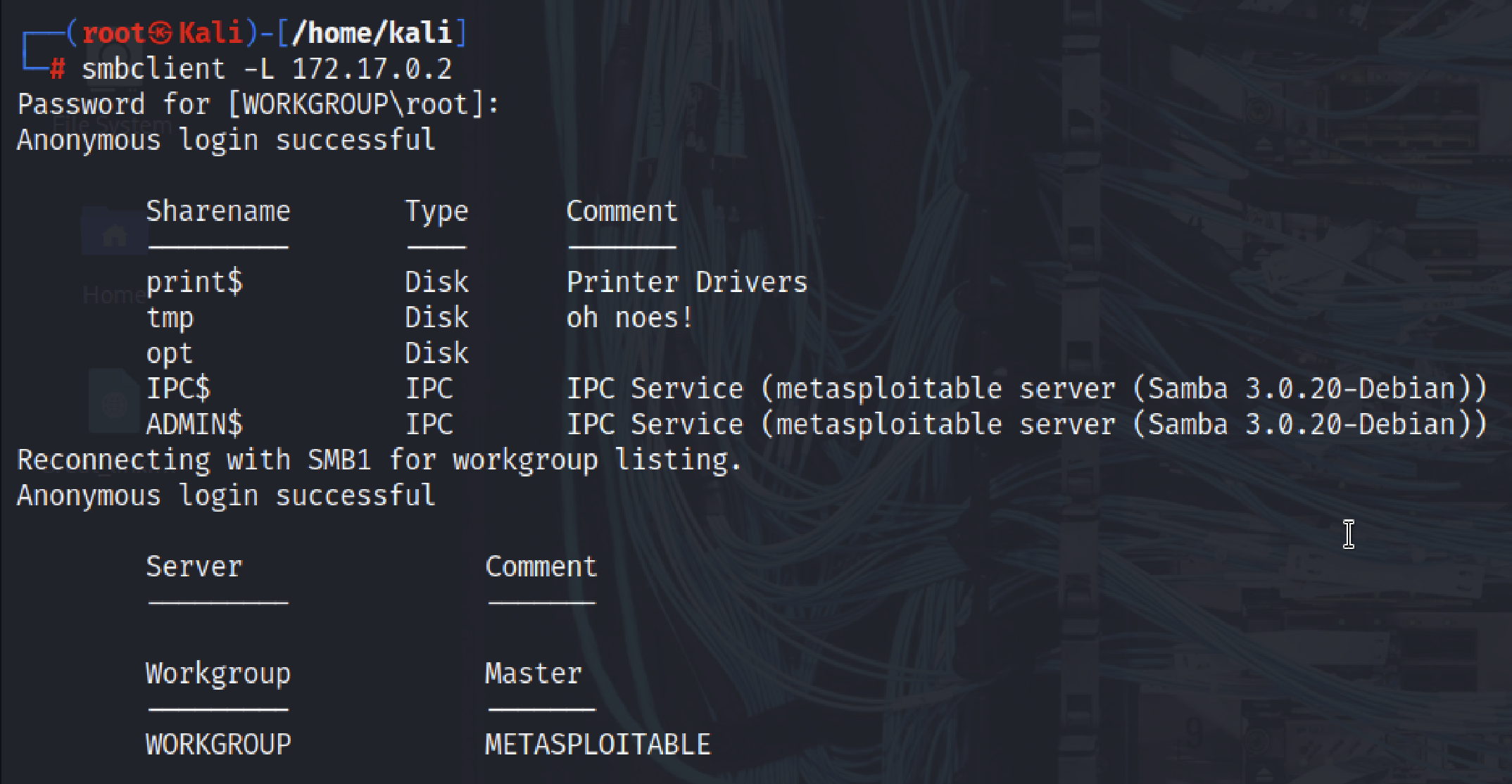
- From the result the “tmp” file share will be used in the experiment for demonstration purposes
- Type in the following command
1
smbclient //172.17.0.2/tmp
- Observed that the prompt changed to smb: >
- Type in the help command to see which commands are available.
- Type in the “dir” command to display the list of files which are available.
Upload the badfile.txt to the target server using the put command. The syntax for the command is:
1
2
3
put local-file-name remote-file-name
-> put badfile.txt badfile.txt
Putting file badfile.txt as badfile.txt (19.5 kb/s) (average 19.5 kb/s)
Finally verify the file has been uploaded by typing in the “dir” command.
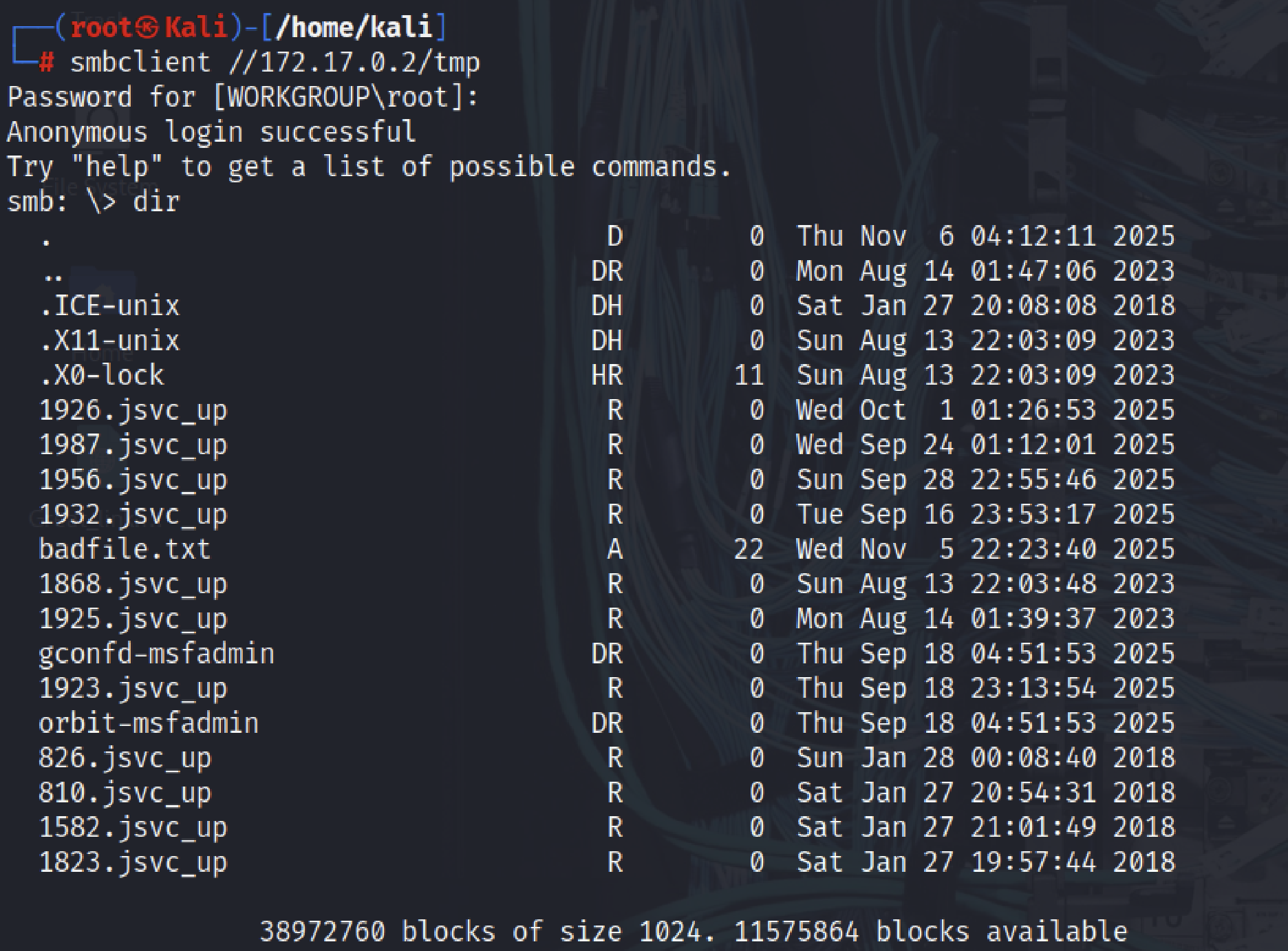
- Type “quit” to exit from the prompt.
Results
Lab target: 172.17.0.2 (isolated VM). Key findings from enumeration and manual verification:
- Null/anonymous session allowed
enum4linuxoutput:Server 172.17.0.2 allows sessions using username '', password ''→ anonymous null session accepted.- Impact: unauthenticated enumeration possible.
- Workgroup (not domain)
Domain Sid: (NULL SID)andWORKGROUPreported → host not joined to AD domain.
- User enumeration (sample accounts)
- Accounts discovered:
root,www-data,user (Name: just a user,111),games,nobody(RID enumeration succeeded). - Impact: reconnaissance data for credential-guessing and attack planning.
- Accounts discovered:
- Shares discovered
print$(printer drivers),tmp(Disk — writable),opt(Disk),IPC$,ADMIN$.tmpwas writable and accepted anonymous uploads in the lab.
- Proof-of-concept file transfer
Successfully uploaded
badfile.txtto//172.17.0.2/tmpusing:1 2
smbclient //172.17.0.2/tmp -N smb: \> put badfile.txt badfile.txt
Verified presence via
dirat thesmbclientprompt.
- Password policy
enum4linux -Preturned password policy info (e.g., low complexity/short lockout thresholds in lab), indicating potential for brute-force attacks.
Overall severity in this lab: Medium–High (anonymous enumeration + writable share), depending on presence of sensitive files and network exposure.
Learnings
- Understood how NetBIOS, LLMNR, and DNS contribute to SMB name resolution and host identification.
- Learned to use the
enum4linuxtool effectively for enumerating SMB services, users, groups, and shares. - Identified how to detect null sessions and analyze SMB shares for potential security weaknesses.
- Practiced using
smbclientto list, access, and transfer files between systems through SMB. - Gained awareness of common SMB misconfigurations (like anonymous access and weak password policies) and their security implications.